<?xml version="1.0" encoding="utf-8"?><feed xmlns="http://www.w3.org/2005/Atom" ><generator uri="https://jekyllrb.com/" version="3.10.0">Jekyll</generator><link href="https://nicolgit.github.io/feed.xml" rel="self" type="application/atom+xml" /><link href="https://nicolgit.github.io/" rel="alternate" type="text/html" /><updated>2026-03-19T08:07:23+00:00</updated><id>https://nicolgit.github.io/feed.xml</id><title type="html">NicolD blog</title><subtitle>Nicola Delfino&apos;s blog</subtitle><author><name>Nicola Delfino</name><email>nicola.delfino@outlook.com</email></author><entry><title type="html">From Idea to Isochrones - Architecting the Proximity Open Source Project</title><link href="https://nicolgit.github.io/proximity-project/" rel="alternate" type="text/html" title="From Idea to Isochrones - Architecting the Proximity Open Source Project" /><published>2026-01-19T10:00:00+00:00</published><updated>2026-01-19T10:00:00+00:00</updated><id>https://nicolgit.github.io/proximity-project</id><content type="html" xml:base="https://nicolgit.github.io/proximity-project/"><![CDATA[<blockquote>
  <p><strong>tl;dr</strong> If you’re interested in the project itself and do not want to waste your time reading this post 😅, here is the <a href="https://github.com/nicolgit/proximity">GitHub repo</a> and here is the <a href="https://proximity.duckiesfarm.com/">Proximity project</a> live.</p>
</blockquote>

<p>For me, open source is not a side activity, it’s a deliberate part of how I practice coding and architecture.</p>

<p>In the enterprise environments I usually work in as a Chief Cloud &amp; AI Architect, architecture is often constrained by existing platforms, organizational inertia, legacy decisions, political trade-offs.</p>

<blockquote>
  <p>Those constraints are real — but they also limit experimentation.</p>
</blockquote>

<p>An open source side project gives me a different space, a place with no hidden assumptions, no artificial deadlines, no “we’ll fix it later in production” — every decision can stand on its own.</p>

<p><strong>The Proximity project</strong> started exactly this way: inspired by <a href="https://www.reddit.com/r/roma/comments/1ib2ue7/mappa_di_roma_dentro_il_raccordo_indicando_in/">a post I found on reddit</a>, it is an open source tool that visualizes walking-distance isochrones from public transport stops (trains, metro, trolleys, buses) across multiple metropolitan areas and a <strong>controlled environment</strong> that allows me to apply patterns and learn to use frameworks that would otherwise remain somewhat sterile without a clear purpose.</p>

<p>The objective of this post is to show why I treat Proximity as more than a toy project: it is a sandbox for practicing real cloud architecture, experimenting with new frameworks, and stress-testing patterns like serverless, IaC, and AI-assisted development in a space where I can make deliberate, opinionated decisions end to end.</p>

<h1 id="the-project">The project</h1>

<p>When talking about public transport accessibility, we often rely on simplified assumptions.</p>

<ul>
  <li>Stops are either “served” or “not served”.</li>
  <li>Areas are either “covered” or “uncovered”.</li>
</ul>

<p>In practice, accessibility is rarely binary.</p>

<p>What really affects usability is not the presence of a stop, but how far people can realistically walk to reach it. Five minutes on a flat sidewalk is very different from five minutes uphill.</p>

<p>Two stops 300 meters apart can serve very different areas.</p>

<blockquote>
  <p>Straight-line distance doesn’t represent how people move.</p>
</blockquote>

<p>What matters is the REAL walking time: Isochrones model this more accurately by showing where you can actually get to within a given walking time.</p>

<p><strong>The Proximity project</strong> uses walking-distance isochrones to make this visible. This problem looks simple on the surface, but it quickly becomes non-trivial when you scale it:</p>

<ul>
  <li>many cities</li>
  <li>many stops</li>
  <li>many transport types</li>
  <li>multiple distance thresholds</li>
  <li>interactive visualization on desktop and mobile browsers</li>
</ul>

<p><img src="../../assets/post/2026/proximity-project/welcome.gif" alt="User interface" /></p>

<p>It forces you to think about data modeling, computation cost, caching, and the frameworks to use.</p>

<p>When I started building, the goal seemed simple: compute walking-distance isochrones for multiple transport stops and display them interactively.</p>

<p><strong>As the project grew, scaling it across cities, transport types, and interactive maps forced deliberate architectural choices.</strong></p>

<h2 id="the-frontend">The Frontend</h2>
<p>SPA with Vue and TypeScript:</p>
<ul>
  <li>TypeScript helps catch errors at compile-time, making the codebase more robust and maintainable than plain JavaScript.</li>
  <li>Vue provides a reactive, component-based framework that is lightweight, easy to reason about, and ideal for building interactive map interfaces.</li>
</ul>

<p>Maps with Leaflet:</p>
<ul>
  <li>Leaflet is fast, flexible, and lightweight. It integrates well with tile-based rendering and supports vector overlays and pin points, which I use to show isochrones.</li>
</ul>

<p>Deployment to a Azure Static Web Apps:</p>
<ul>
  <li>Benefits: fast global distribution, low cost, automatic HTTPS, and seamless integration with GitHub CI/CD.</li>
  <li>The SPA model pairs perfectly with static hosting, as most logic runs client-side while fetching precomputed data.</li>
</ul>

<h2 id="the-backend">The Backend</h2>
<p>Azure Functions in C#:</p>
<ul>
  <li>C# provides strong typing and mature tooling, which helps maintain reliability in serverless code.</li>
  <li>Serverless functions are cheap, scale automatically, and fit perfectly for event-driven tasks like serving requests for metadata or trigger-based operations.</li>
</ul>

<h2 id="data-storage-and-caching">Data storage and caching</h2>
<p>On the data side:</p>
<ul>
  <li>Areas metadata are stored in Azure Table Storage</li>
  <li>Isochrone JSON blobs are stored in Azure Blob Storage with CDN-friendly headers</li>
</ul>

<p>Benefits: fast, cheap, globally distributed, and easy to update. Most of the data is relatively static, so caching reduces latency and costs.</p>

<h2 id="isochrone-computation">Isochrone computation</h2>
<p>Real-time computation of walking-distance isochrones <strong>is too expensive</strong>: iterating over the pedestrian network for thousands of stops and stations would be slow. So I opted for offline precomputation using a CLI generator written in C#.</p>

<p>In this setup:</p>
<ul>
  <li>Mapbox APIs handle the heavy lifting of isochrone calculation</li>
  <li>OpenStreetMap data is retrieved through the Overpass API to collect the stops to analyze</li>
  <li>All results are stored in Blob Storage, ready to be served by the SPA</li>
</ul>

<p>This approach balances accuracy, performance, and cost without compromising interactivity.</p>

<h1 id="deploy-on-azure">Deploy on Azure</h1>
<p>Proximity isn’t just about computing isochrones and displaying them.
Running it reliably and securely in the cloud requires careful architectural choices.</p>

<p><img src="../../assets/post/2026/proximity-project/architecture.png" alt="Azure Architecture" /></p>

<p><em>Architecture deployed on Azure</em></p>

<p><img src="../../assets/post/2026/proximity-project/RBAC.png" alt="Azure function system identity RBAC" /></p>

<p><em>Azure function system identity RBAC</em></p>

<h2 id="infrastructure-as-code-iac">Infrastructure as Code (IaC)</h2>
<p>All resources are deployed using Infrastructure-as-Code written in <strong>Bicep</strong>. Benefits:</p>
<ul>
  <li>Reproducibility: environments can be recreated consistently</li>
  <li>Traceability: every change is tracked in source control</li>
  <li>Ease of iteration: no manual clicks, everything is declarative</li>
</ul>

<h2 id="azure-network-isolation">Azure network isolation</h2>
<ul>
  <li>All backend services run behind a private endpoint in an isolated Azure virtual network.</li>
  <li>Frontend accesses backend securely through this private link.</li>
  <li>System-assigned identities are used for authentication between services, eliminating the need for secrets in code.</li>
</ul>

<p>Advantages:</p>
<ul>
  <li>Strong security posture by default</li>
  <li>Minimizes attack surface</li>
  <li>Simplifies credential management and compliance</li>
</ul>

<h2 id="cicd-with-github-actions">CI/CD with GitHub Actions</h2>
<p>Both frontend and backend are deployed automatically via 2 GitHub Actions:</p>
<ol>
  <li>Builds and deploys SPA to Azure Static Web Apps</li>
  <li>Builds and deploys Azure Functions</li>
</ol>

<p>Benefits:</p>

<ul>
  <li>Fully automated workflow</li>
  <li>Fast and repeatable deployments</li>
  <li>Low operational overhead</li>
</ul>

<h1 id="key-trade-offs-and-deliberate-architectural-choices">Key trade-offs and deliberate architectural choices</h1>

<ul>
  <li>Avoided fully dynamic computation → would be too slow and costly</li>
  <li>Chose serverless → cheap, scalable, low ops overhead</li>
  <li>Avoided monolithic backend → caching and offline computation are simpler with a clean separation</li>
  <li>Opted for TypeScript + Vue → maintainable frontend without unnecessary complexity</li>
  <li>Leaflet → lightweight and flexible for map visualization</li>
</ul>

<p>Each choice reflects a trade-off between simplicity, performance, and maintainability.</p>

<p>Building Proximity was a technically simple idea on paper, but the process taught me many lessons — both about architecture and about using AI-assisted development.</p>

<h2 id="highlights">Highlights</h2>
<ul>
  <li>VS Code + Copilot accelerated development <strong>enormously</strong>.</li>
  <li>Writing C# code I already knew well, I went from hours to minutes on many tasks.</li>
  <li>For Vue and Leaflet, which were completely new to me, Copilot helped me scaffold components and learn the development paradigm quickly.</li>
  <li>Rapid prototyping and iteration became possible: I could test frontend-backend interactions without blocking myself on unfamiliar frameworks.</li>
  <li>Hands-on experience with new libraries: I now have a solid foundation in Vue and Leaflet, which will inform future projects.</li>
</ul>

<h2 id="lowlights">Lowlights</h2>
<ul>
  <li>At first, I let AI drive too much of the frontend implementation because I wanted to see what it would produce.
    <ul>
      <li><strong>Result</strong>: some code is verbose, repetitive, or not as clean as I would have written manually.</li>
      <li><strong>Lesson</strong>: when using AI for new technologies, prepare focused, precise prompts for better results.</li>
    </ul>
  </li>
  <li>Refactoring is still needed: even with AI, improving structure or fixing repeated patterns takes time.
    <ul>
      <li>Proper upfront design reduces refactoring and ensures maintainable code.</li>
    </ul>
  </li>
</ul>

<h1 id="key-takeaways">Key takeaways</h1>

<ul>
  <li>AI can accelerate coding and learning, but it does not replace careful planning.</li>
  <li>Spend time upfront defining prompts, patterns, and architecture, especially with unfamiliar technologies.</li>
  <li>Iterating on real projects is the fastest way to learn frameworks and libraries.</li>
  <li>Trade-offs are unavoidable: balance speed, maintainability, and clarity.</li>
  <li><strong>The Proximity Project</strong> became not just a tool, but a learning experience, combining architectural thinking, cloud deployment, and AI-assisted development.</li>
</ul>

<h1 id="want-to-go-deeper">Want to go deeper?</h1>

<p>If you made it this far, <strong>thank you for reading</strong> 😅.</p>

<p>If you’d like to explore more:</p>

<ul>
  <li><strong>Try the live tool: <a href="https://proximity.duckiesfarm.com/">Proximity project</a></strong></li>
  <li><strong>Browse the source code: <a href="https://github.com/nicolgit/proximity">GitHub repo</a></strong></li>
</ul>

<p>If you have ideas, suggestions, or spot something that could be improved, <strong>please open an issue on GitHub</strong> — that’s the best place to discuss features, fixes, and architectural decisions.</p>]]></content><author><name>Nicola Delfino</name><email>nicola.delfino@outlook.com</email></author><category term="Open Source" /><category term="Proximity project" /><category term="Azure" /><category term="Architecture" /><category term="Serverless" /><category term="Bicep" /><category term="Vue" /><category term="Leaflet" /><category term="AI" /><summary type="html"><![CDATA[Proximity project - a sandbox for practicing real cloud architecture, experimenting with new frameworks, and stress-testing patterns like serverless, IaC, and AI-assisted development in a space where I can make deliberate, opinionated decisions end to end.]]></summary></entry><entry><title type="html">Azure Private Endpoint Routing in Hub-and-Spoke Networks: Understanding the hidden behavior</title><link href="https://nicolgit.github.io/cross-spokes-routing-for-private-endpoint/" rel="alternate" type="text/html" title="Azure Private Endpoint Routing in Hub-and-Spoke Networks: Understanding the hidden behavior" /><published>2025-09-01T10:00:00+00:00</published><updated>2025-09-01T10:00:00+00:00</updated><id>https://nicolgit.github.io/cross-spokes-routing-for-private-endpoint</id><content type="html" xml:base="https://nicolgit.github.io/cross-spokes-routing-for-private-endpoint/"><![CDATA[<p>Recently, I helped a customer understand a puzzling behavior related to a private endpoint deployed in a classic Azure hub-and-spoke network topology.</p>

<h2 id="tldr">TL;DR</h2>

<p>The reason for the apparently anomalous behavior of private endpoints is that, although a private endpoint appears in the Azure portal as a network interface (NIC) connected to a subnet, <strong>it’s actually implemented completely differently under the hood</strong>.</p>

<p>When Azure creates a private endpoint and attaches it to a subnet, what actually happens is that Azure creates explicit routes on all NICs connected to the VNet where the private endpoint is activated.</p>

<p><strong>These same routes are also added to the NICs of all virtual machines connected to networks that are peered with the one where the private endpoint is exposed.</strong></p>

<p>Let me walk you through the details.</p>

<h2 id="the-network-scenario">The Network Scenario</h2>

<p>The situation is shown in the following diagram: there are 2 spoke VNets connected to a hub VNet. The hub contains an Azure Firewall configured to allow any-to-any traffic. The requirement was to avoid exposing the private endpoint externally to spoke networks, and the idea was to not attach any route table to the private endpoint subnet.</p>

<p><img src="../../assets/post/2025/private-endpoint-routing/schema-01.png" alt="schema-01" /></p>

<p>In this configuration, we would expect the following connectivity to the storage account:</p>

<h2 id="expected-vs-actual-behavior">Expected vs. Actual Behavior</h2>

<p><strong>Expected connectivity:</strong></p>
<ul>
  <li>spoke-01-vm HTTPS to storage-01: ❌ FAIL (missing return route)</li>
  <li>spoke-02-vm HTTPS to storage-01: ✅ OK (same subnet)</li>
  <li>hub-vm-01 HTTPS to storage-01: ✅ OK (direct peering exists)</li>
</ul>

<p><strong>Actual connectivity:</strong></p>
<ul>
  <li>spoke-01-vm HTTPS to storage-01: ✅ OK</li>
  <li>spoke-02-vm HTTPS to storage-01: ✅ OK</li>
  <li>hub-vm-01 HTTPS to storage-01: ✅ OK</li>
</ul>

<p>WHY ?!?!? :-)</p>

<h2 id="understanding-the-root-cause">Understanding the Root Cause</h2>

<p>When examining the effective routes of <code class="language-plaintext highlighter-rouge">hub-vm-01</code>, we find the following route:</p>

<p><img src="../../assets/post/2025/private-endpoint-routing/effective-routes.png" alt="effective route" /></p>

<p>The same route is present on the NICs of the firewall VMs as well. This means it’s <strong>as if storage-01 is connected to both spoke-02 and the hub network</strong>.</p>

<p><img src="../../assets/post/2025/private-endpoint-routing/schema-02.png" alt="schema-02" /></p>

<h3 id="how-the-traffic-actually-flows">How the Traffic Actually Flows</h3>

<p>When <code class="language-plaintext highlighter-rouge">spoke-01-vm</code> tries to contact the storage account:</p>

<ol>
  <li><strong>Outbound traffic</strong>: Thanks to the route table on its subnet, traffic reaches the firewall and then goes directly to the private endpoint (pip-01), without passing through the peering to spoke-02</li>
  <li><strong>Return traffic</strong>: Since the private endpoint behaves “as if” it’s also connected to the hub, the response from pip-01 can reach spoke-01-vm without needing the routing table and without passing through the firewall, because it only traverses one peering instead of two.</li>
</ol>

<p><img src="../../assets/post/2025/private-endpoint-routing/schema-03.png" alt="schema-03" /></p>

<h2 id="the-solution-centralized-firewall-control">The Solution: Centralized Firewall Control</h2>

<p>One effective way to solve this is:</p>

<ol>
  <li><strong>Add a route table to the private endpoint subnet</strong> that redirects traffic to the firewall</li>
  <li><strong>Manage access control at the firewall level</strong> to block or allow access to that subnet</li>
</ol>

<p><img src="../../assets/post/2025/private-endpoint-routing/schema-04.png" alt="schema-04" /></p>

<blockquote>
  <p>⚠️Warning⚠️: when a route table is associated with a subnet, by default it is not applied to private endpoints as well, so it’s necessary to remember to enable the option Network Policy for Private Endpoints &gt; Private endpoint network policy &gt; <code class="language-plaintext highlighter-rouge">route tables</code> on the subnet.</p>
</blockquote>

<h3 id="why-this-approach-works">Why This Approach Works</h3>

<p>Centralizing control at the firewall level is an approach I’ve seen applied in numerous contexts, and from a management perspective, it’s generally a good compromise because:</p>

<ul>
  <li><strong>Centralized security policies</strong>: All traffic rules are managed in one place</li>
  <li><strong>Consistent logging and monitoring</strong>: All traffic flows through a single inspection point</li>
  <li><strong>Simplified troubleshooting</strong>: Network issues can be diagnosed from a central location</li>
  <li><strong>Scalability</strong>: New spokes can be added without complex routing configurations</li>
</ul>

<h2 id="key-takeaways">Key Takeaways</h2>

<ol>
  <li><strong>Private endpoints create implicit routes</strong> across all peered VNets, not just the VNet where they’re deployed</li>
  <li><strong>Portal representation is misleading</strong>: While they appear as NICs in a subnet, their routing behavior is different</li>
  <li><strong>Route tables alone aren’t sufficient</strong> for controlling private endpoint access in hub-and-spoke topologies</li>
  <li><strong>Firewall-centric control</strong> provides better security and management capabilities</li>
</ol>

<h2 id="related-resources">Related Resources</h2>

<p>For more detailed information on this specific topic, check out</p>

<ul>
  <li>🔝 <a href="https://blog.cloudtrooper.net/2025/01/20/private-link-reality-bites-private-endpoints-are-an-illusion/">Private endpoints are an illusion</a></li>
  <li><a href="https://learn.microsoft.com/en-us/azure/private-link/">Azure Private Link documentation</a></li>
  <li><a href="https://learn.microsoft.com/en-us/azure/architecture/reference-architectures/hybrid-networking/hub-spoke">Hub-spoke network topology in Azure</a></li>
  <li><a href="https://learn.microsoft.com/en-us/azure/firewall/firewall-faq">Azure Firewall in a hub-spoke network</a></li>
</ul>]]></content><author><name>Nicola Delfino</name><email>nicola.delfino@outlook.com</email></author><category term="Azure" /><category term="Networking" /><category term="Private Endpoint" /><category term="Hub-and-Spoke" /><category term="Security" /><summary type="html"><![CDATA[Discover why Azure private endpoints behave unexpectedly in hub-and-spoke networks by creating implicit routes across peered VNets, and learn effective solutions to maintain centralized traffic control through Azure Firewall.]]></summary></entry><entry><title type="html">How to quickly deploy a test web server on an Azure VM</title><link href="https://nicolgit.github.io/provision-a-test-vm-webserver-on-azure/" rel="alternate" type="text/html" title="How to quickly deploy a test web server on an Azure VM" /><published>2025-06-15T10:00:00+00:00</published><updated>2025-06-15T10:00:00+00:00</updated><id>https://nicolgit.github.io/provision-a-test-vm-webserver-on-azure</id><content type="html" xml:base="https://nicolgit.github.io/provision-a-test-vm-webserver-on-azure/"><![CDATA[<p>For my <strong>Labs</strong>, I often need to create and build virtual machines. <strong>Many virtual machines</strong> :-). One of the most “popular” machine recently is for me the web server. The requirement for my needs is often very simple: <strong>create a web server that responds on port 80, that is able to make me understand “what machine I’m interacting with”</strong>, so, the ideal response message to the request <em>http://my-machine-ip</em> should be “<em>myMachineName</em>”.</p>

<h1 id="windows-machine">Windows machine</h1>
<p>Once the machine is created, go to Azure Portal &gt; virtual machines &gt; <code class="language-plaintext highlighter-rouge">vmname</code> &gt; run command &gt; run powershell script</p>

<p>type:</p>

<div class="language-powershell highlighter-rouge"><div class="highlight"><pre class="highlight"><code><span class="n">Install-WindowsFeature</span><span class="w"> </span><span class="nt">-name</span><span class="w"> </span><span class="nx">Web-Server</span><span class="w"> </span><span class="nt">-IncludeManagementTools</span><span class="w">
</span><span class="n">Remove-Item</span><span class="w"> </span><span class="nt">-Path</span><span class="w"> </span><span class="s1">'C:\inetpub\wwwroot\iisstart.htm'</span><span class="w">
</span><span class="n">Add-Content</span><span class="w"> </span><span class="nt">-Path</span><span class="w"> </span><span class="s1">'C:\inetpub\wwwroot\iisstart.htm'</span><span class="w"> </span><span class="nt">-Value</span><span class="w"> </span><span class="err">$</span><span class="p">(</span><span class="nv">$</span><span class="nn">env</span><span class="p">:</span><span class="nv">computername</span><span class="p">)</span><span class="w">
</span></code></pre></div></div>

<p>click <strong>Run</strong></p>

<p>After a couple of minutes the script will be executed, and IIS will be provisioned and working.</p>

<p><img src="../../assets/post/2021/install-iis-output.png" alt="browser output" /></p>

<h1 id="linux-machine">Linux machine</h1>
<p>Once the machine is created, go tpo Azure Portal &gt; virtual machines &gt; <code class="language-plaintext highlighter-rouge">vmname</code> &gt; run command &gt; run linux shell script</p>

<p>type:</p>

<div class="language-shell highlighter-rouge"><div class="highlight"><pre class="highlight"><code><span class="nb">sudo </span>apt-get update
<span class="nb">sudo </span>apt-get <span class="nb">install</span> <span class="nt">-y</span> nginx
<span class="nb">sudo rm</span> /var/www/html/index.html
<span class="nb">echo</span> <span class="nv">$HOSTNAME</span> | <span class="nb">sudo tee</span> /var/www/html/index.html
</code></pre></div></div>

<p>click <strong>Run</strong></p>

<p>After a couple of minutes the script will be executed, and IIS will be provisioned and working.</p>

<p><img src="../assets/post/2021/install-iis-output.png" alt="browser output" /></p>]]></content><author><name>Nicola Delfino</name><email>nicola.delfino@outlook.com</email></author><category term="Azure" /><category term="Virtual Machine" /><category term="Portal" /><category term="web server" /><category term="custom script extension" /><summary type="html"><![CDATA[For my Labs, I often need to create and build virtual machines. Many virtual machines :-). One of the most “popular” machine recently is for me the web server. The requirement for my needs is often very simple: create a web server that responds on port 80, that is able to make me understand “what machine I’m interacting with”, so, the ideal response message to the request http://my-machine-ip should be “myMachineName”.]]></summary></entry><entry><title type="html">Azure Open AI recipes for Azure API Management Service</title><link href="https://nicolgit.github.io/aoai-recipes-for-apim/" rel="alternate" type="text/html" title="Azure Open AI recipes for Azure API Management Service" /><published>2025-02-27T10:00:00+00:00</published><updated>2025-02-27T10:00:00+00:00</updated><id>https://nicolgit.github.io/aoai-recipes-for-apim</id><content type="html" xml:base="https://nicolgit.github.io/aoai-recipes-for-apim/"><![CDATA[<p>Azure OpenAI (AOAI) Service provides REST API access to OpenAI’s powerful language models including o1, o1-mini, GPT-4o, GPT-4o mini, GPT-4 Turbo with Vision, GPT-4, GPT-3.5-Turbo, and Embeddings model series. These models can be easily adapted to your specific task including but not limited to content generation, summarization, image understanding, semantic search, and natural language to code translation.</p>

<p>Azure API Management(APIM), on the other hand, is a comprehensive API management platform that helps enterprises manage, secure, and monitor their APIs. It provides features such as API gateway, rate limiting, analytics, and developer portal, making it easier for businesses to expose their services to internal and external consumers.</p>

<p>By using Azure API Manager in front of Azure Open AI instances, enterprises can ensure better control, security, and visibility over their AI deployments. This setup allows for centralized management of API traffic, improved performance through caching and load balancing, and enhanced security with features like authentication and authorization.</p>

<p><strong>In this post, I present a collection of API Management recipes that I have gathered while assisting various customers and partners in exposing one or more instances of Azure OpenAI through Azure API Manager.</strong></p>

<blockquote>
  <p>Network configuration and integration with an Enterprise-scale landing zone (ESLZ) is out of scope of this post. For a walkthrough that guides the integration of APIM and AOAI in a hub &amp; spoke context, you can also refer to <a href="https://github.com/nicolgit/hub-and-spoke-playground/blob/main/scenarios/aoai.md">my article</a> available as part of <a href="https://github.com/nicolgit/hub-and-spoke-playground">the hub-and-spoke playground project</a>.</p>
</blockquote>

<p>The lab used for these walk-throughs consists of the following resources:</p>

<ul>
  <li>1 x Azure API Management service (developer SKU) <code class="language-plaintext highlighter-rouge">nicold-apim</code></li>
  <li>2 x Azure OpenAI service (S0 SKU) <code class="language-plaintext highlighter-rouge">apimaoai01</code> and <code class="language-plaintext highlighter-rouge">apimaoai02</code></li>
</ul>

<p><img src="../../assets/post/2025/apim-aoai/00-architecture.png" alt="architecture" /></p>

<p>This is the list of topic I will cover:</p>

<ul>
  <li><a href="#add-azure-open-ai-as-apim-backend-resource">Add Azure Open AI as APIM backend resource</a></li>
  <li><a href="#expose-apim-001-endpoint-as-apim-root-api">Expose <code class="language-plaintext highlighter-rouge">apim-001</code> endpoint as APIM root API</a></li>
  <li><a href="#implement-throttling">Implement throttling</a></li>
  <li><a href="#show-in-a-response-header-aoai-origin-the-host-of-the-openai-api-called">Show in a Response header (<em>aoai-origin</em>) the host of the OpenAI API Called</a></li>
  <li><a href="#round-robin-calls-between-2-instances-of-open-ai">Round robin calls between 2 instances of Open AI</a></li>
  <li><a href="#fallback-on-a-second-openai-instance-for-60-secs-if-the-first-answers-with-429-error-exceeded-token-rate-limit">Fallback on a second openAI instance for 60 secs, if the first answers with 429 error (exceeded token rate limit)</a></li>
  <li><a href="#generate-a-report-of-api-usage-by-access-key">Generate a report of API Usage by access key</a></li>
  <li><a href="#generate-a-report-of-api-usage-by-source-ip">Generate a report of API Usage by source IP</a></li>
  <li><a href="#generate-a-report-of-backends-usage-over-time">Generate a report of backends usage over time</a></li>
  <li><a href="#generate-a-report-of-api-requests-by-openai-grouped-by-deployment-id">Generate a report of API requests by OpenAI grouped by deployment-id</a></li>
</ul>

<h1 id="add-azure-open-ai-as-apim-backend-resource">Add Azure Open AI as APIM backend resource</h1>

<p>Go to API Management services &gt; <code class="language-plaintext highlighter-rouge">nicold-apim</code> &gt; Backends &gt; Add</p>
<ul>
  <li>Name: <code class="language-plaintext highlighter-rouge">apim-001</code></li>
  <li>Backend hosting type: Custom URL</li>
  <li>Runtime URL: https://nicold-aoai-001.openai.azure.com/openai</li>
  <li>Authorization credential
    <ul>
      <li>Headers
        <ul>
          <li>Name: <code class="language-plaintext highlighter-rouge">api-key</code></li>
          <li>Key: <em>your endpoint key</em></li>
        </ul>
      </li>
    </ul>
  </li>
  <li>Click [create]</li>
</ul>

<p>Go to API Management services &gt; <code class="language-plaintext highlighter-rouge">nicold-apim</code> &gt; Backends &gt; Add</p>
<ul>
  <li>Name: <code class="language-plaintext highlighter-rouge">apim-002</code></li>
  <li>Backend hosting type: Custom URL</li>
  <li>Runtime URL: https://nicold-aoai-002.openai.azure.com/openai</li>
  <li>Authorization credential
    <ul>
      <li>Headers
        <ul>
          <li>Name: <code class="language-plaintext highlighter-rouge">api-key</code></li>
          <li>Key: <em>your endpoint key</em></li>
        </ul>
      </li>
    </ul>
  </li>
  <li>Click [create]</li>
</ul>

<p>Here is the result:
<img src="../../assets/post/2025/apim-aoai/01-add-backend-resources.png" alt="backend resources added" /></p>

<h1 id="expose-apim-001-endpoint-as-apim-root-api">Expose <code class="language-plaintext highlighter-rouge">apim-001</code> endpoint as APIM root API</h1>

<p>Go to Azure Portal &gt; API Management Services &gt; <code class="language-plaintext highlighter-rouge">nicold-apim</code> &gt; API &gt; Create from Azure Resources &gt; Azure OpenAI Service</p>
<ul>
  <li>Azure OpenAI instance: <code class="language-plaintext highlighter-rouge">nicold-aoai-001</code></li>
  <li>API Version: <code class="language-plaintext highlighter-rouge">2024-02-01</code></li>
  <li>Display name: <code class="language-plaintext highlighter-rouge">/</code></li>
  <li>Name: <code class="language-plaintext highlighter-rouge">root-api</code></li>
  <li>Click [review and create] and then [create]</li>
</ul>

<p>This creates a frontend but ALSO a backend. To use the previously created backend, go to:</p>

<p>API Management Services &gt; <code class="language-plaintext highlighter-rouge">nicold-apim</code> &gt; APIs &gt; All APIs &gt; <code class="language-plaintext highlighter-rouge">/</code> &gt; Design &gt; Backend &gt; Policies &gt; Base</p>

<p>and change <code class="language-plaintext highlighter-rouge">backend-id="openai-root-openai-endpoint"</code> to <code class="language-plaintext highlighter-rouge">backend-id="apim-001"</code>, then save it.</p>

<p>To test this endpoint, go to: API Management Services &gt; <code class="language-plaintext highlighter-rouge">nicold-apim</code> &gt; APIs &gt; All APIs &gt; <code class="language-plaintext highlighter-rouge">/</code> &gt; Test &gt; <code class="language-plaintext highlighter-rouge">Creates a completion for the chat message</code></p>
<ul>
  <li>Deployment-id: <code class="language-plaintext highlighter-rouge">gpt4o-001</code></li>
  <li>API-version: <code class="language-plaintext highlighter-rouge">2024-02-01</code> (same as used above)</li>
  <li>Request body: <code class="language-plaintext highlighter-rouge">{"messages": [{ "role": "system","content": "You are a helpful assistant."},{ "role": "user", "content": "Tell me a joke!"} ]}</code></li>
  <li>Click: [SEND]</li>
</ul>

<p>Here is also a PowerShell script to test this configuration:</p>

<pre><code class="language-ps1">$openai = @{
   api_key     = "my-api-key"
   api_base    = "https://nicold-apim.azure-api.net/" # your endpoint
   api_version = '2024-02-01'
   name        = 'gpt4o-001' # custom name you chose for your deployment
}

$body = '{
  "messages": [
    { "role": "system","content": "You are a helpful assistant."},
    { "role": "user", "content": "Tell me a joke!"}
  ]}'

# Header for authentication
$headers = [ordered]@{
   'api-key' = $openai.api_key
}

# Send a request to generate an answer
$url = "$($openai.api_base)/deployments/$($openai.name)/chat/completions?api-version=$($openai.api_version)"

$response = Invoke-WebRequest -Uri $url -Headers $headers -Body $body -Method Post -ContentType 'application/json'

# Show response headers
$response.headers
$responseObj = ConvertFrom-Json $response.content

# Show response body
$responseObj.choices.message.content
</code></pre>

<h1 id="implement-throttling">Implement throttling</h1>
<p>The following policy limits access to <strong>10 requests per minute</strong>. 
Paste the XML in: API Management Service &gt; <code class="language-plaintext highlighter-rouge">nicold-apim</code> &gt; APIs &gt; All APIs &gt; <code class="language-plaintext highlighter-rouge">/</code> &gt; all operations &gt; inbound processing &gt; policies (code editor)</p>

<div class="language-xml highlighter-rouge"><div class="highlight"><pre class="highlight"><code><span class="nt">&lt;policies&gt;</span>
    <span class="nt">&lt;inbound&gt;</span>
        <span class="nt">&lt;base</span> <span class="nt">/&gt;</span>
        <span class="nt">&lt;rate-limit</span> <span class="na">calls=</span><span class="s">"10"</span> <span class="na">renewal-period=</span><span class="s">"60"</span> <span class="nt">/&gt;</span>
        <span class="nt">&lt;set-backend-service</span> <span class="na">id=</span><span class="s">"apim-generated-policy"</span> <span class="na">backend-id=</span><span class="s">"apim-001"</span> <span class="nt">/&gt;</span>
    <span class="nt">&lt;/inbound&gt;</span>
    <span class="nt">&lt;backend&gt;</span>
        <span class="nt">&lt;base</span> <span class="nt">/&gt;</span>
    <span class="nt">&lt;/backend&gt;</span>
    <span class="nt">&lt;outbound&gt;</span>
        <span class="nt">&lt;base</span> <span class="nt">/&gt;</span>
    <span class="nt">&lt;/outbound&gt;</span>
    <span class="nt">&lt;on-error&gt;</span>
        <span class="nt">&lt;base</span> <span class="nt">/&gt;</span>
    <span class="nt">&lt;/on-error&gt;</span>
<span class="nt">&lt;/policies&gt;</span>
</code></pre></div></div>

<p>To limit to 2 calls <strong>per IP</strong> in 60 seconds, use the following rate-limit XML:</p>
<div class="language-xml highlighter-rouge"><div class="highlight"><pre class="highlight"><code><span class="nt">&lt;rate-limit-by-key</span> <span class="na">calls=</span><span class="s">"2"</span> <span class="na">renewal-period=</span><span class="s">"60"</span> <span class="na">counter-key=</span><span class="s">"@(context.Request.IpAddress)"</span> <span class="nt">/&gt;</span>
</code></pre></div></div>

<p>To limit to 2 calls per API KEY in 60 seconds, use the following rate-limit XML:</p>
<div class="language-xml highlighter-rouge"><div class="highlight"><pre class="highlight"><code><span class="nt">&lt;rate-limit-by-key</span> <span class="na">calls=</span><span class="s">"2"</span> <span class="na">renewal-period=</span><span class="s">"60"</span> <span class="na">counter-key=</span><span class="s">"@(context.Request.Headers.GetValueOrDefault("</span><span class="err">api-key"))"</span> <span class="nt">/&gt;</span>
</code></pre></div></div>

<h1 id="show-in-a-response-header-aoai-origin-the-host-of-the-openai-api-called">Show in a Response header (<em>aoai-origin</em>) the host of the OpenAI API Called</h1>

<p>Paste the XML in: API Management Service &gt; <code class="language-plaintext highlighter-rouge">nicold-apim</code> &gt; APIs &gt; All APIs &gt; <code class="language-plaintext highlighter-rouge">/</code> &gt; all operations &gt; inbound processing &gt; policies (code editor), in the <strong>outbound</strong> policy:</p>

<div class="language-xml highlighter-rouge"><div class="highlight"><pre class="highlight"><code><span class="nt">&lt;outbound&gt;</span>
    <span class="nt">&lt;base</span> <span class="nt">/&gt;</span>
    <span class="nt">&lt;set-header</span> <span class="na">name=</span><span class="s">"aoai-origin"</span> <span class="na">exists-action=</span><span class="s">"override"</span><span class="nt">&gt;</span>
        <span class="nt">&lt;value&gt;</span>@(context.Request.Url.Host)<span class="nt">&lt;/value&gt;</span>
    <span class="nt">&lt;/set-header&gt;</span>
<span class="nt">&lt;/outbound&gt;</span>
</code></pre></div></div>

<h1 id="round-robin-calls-between-2-instances-of-open-ai">Round robin calls between 2 instances of Open AI</h1>
<p>The following policy implements a round-robin between 2 backends: <code class="language-plaintext highlighter-rouge">apim-001</code> and <code class="language-plaintext highlighter-rouge">apim-002</code>.</p>

<p>Paste the XML in: API Management Service &gt; <code class="language-plaintext highlighter-rouge">nicold-apim</code> &gt; APIs &gt; All APIs &gt; <code class="language-plaintext highlighter-rouge">/</code> &gt; all operations &gt; inbound processing &gt; policies (code editor)</p>

<div class="language-xml highlighter-rouge"><div class="highlight"><pre class="highlight"><code><span class="nt">&lt;policies&gt;</span>
	<span class="nt">&lt;inbound&gt;</span>
		<span class="nt">&lt;base</span> <span class="nt">/&gt;</span>
		<span class="nt">&lt;cache-lookup-value</span> <span class="na">key=</span><span class="s">"backend-rr"</span> <span class="na">variable-name=</span><span class="s">"backend-rr"</span> <span class="nt">/&gt;</span>
		<span class="nt">&lt;choose&gt;</span>
			<span class="nt">&lt;when</span> <span class="na">condition=</span><span class="s">"@(!context.Variables.ContainsKey("</span><span class="err">backend-rr"))"</span><span class="nt">&gt;</span>
				<span class="nt">&lt;set-variable</span> <span class="na">name=</span><span class="s">"backend-rr"</span> <span class="na">value=</span><span class="s">"0"</span> <span class="nt">/&gt;</span>
				<span class="nt">&lt;cache-store-value</span> <span class="na">key=</span><span class="s">"backend-rr"</span> <span class="na">value=</span><span class="s">"0"</span> <span class="na">duration=</span><span class="s">"100"</span> <span class="nt">/&gt;</span>
			<span class="nt">&lt;/when&gt;</span>
		<span class="nt">&lt;/choose&gt;</span>
		<span class="nt">&lt;choose&gt;</span>
			<span class="nt">&lt;when</span> <span class="na">condition=</span><span class="s">"@(Convert.ToInt32(context.Variables["</span><span class="err">backend-rr"])</span> <span class="err">==</span> <span class="err">0)"</span><span class="nt">&gt;</span>
				<span class="nt">&lt;set-backend-service</span> <span class="na">backend-id=</span><span class="s">"apim-001"</span> <span class="nt">/&gt;</span>
				<span class="nt">&lt;cache-store-value</span> <span class="na">key=</span><span class="s">"backend-rr"</span> <span class="na">value=</span><span class="s">"1"</span> <span class="na">duration=</span><span class="s">"100"</span> <span class="nt">/&gt;</span>
			<span class="nt">&lt;/when&gt;</span>
			<span class="nt">&lt;otherwise&gt;</span>
				<span class="nt">&lt;set-backend-service</span> <span class="na">backend-id=</span><span class="s">"apim-002"</span> <span class="nt">/&gt;</span>
				<span class="nt">&lt;cache-store-value</span> <span class="na">key=</span><span class="s">"backend-rr"</span> <span class="na">value=</span><span class="s">"0"</span> <span class="na">duration=</span><span class="s">"100"</span> <span class="nt">/&gt;</span>
			<span class="nt">&lt;/otherwise&gt;</span>
		<span class="nt">&lt;/choose&gt;</span>
	<span class="nt">&lt;/inbound&gt;</span>
	<span class="nt">&lt;backend&gt;</span>
		<span class="nt">&lt;base</span> <span class="nt">/&gt;</span>
	<span class="nt">&lt;/backend&gt;</span>
	<span class="nt">&lt;outbound&gt;</span>
		<span class="nt">&lt;base</span> <span class="nt">/&gt;</span>
	<span class="nt">&lt;/outbound&gt;</span>
	<span class="nt">&lt;on-error&gt;</span>
		<span class="nt">&lt;base</span> <span class="nt">/&gt;</span>
	<span class="nt">&lt;/on-error&gt;</span>
<span class="nt">&lt;/policies&gt;</span>
</code></pre></div></div>
<blockquote>
  <p>💥 In a round robin scenario, in order to work properly, both OpenAI instances must have the same deployments.</p>
</blockquote>

<h1 id="fallback-on-a-second-openai-instance-for-60-secs-if-the-first-answers-with-429-error-exceeded-token-rate-limit">Fallback on a second openAI instance for 60 secs, if the first answers with 429 error (exceeded token rate limit)</h1>

<p>The following policy uses the <code class="language-plaintext highlighter-rouge">apim-001</code> backend until it responds with <code class="language-plaintext highlighter-rouge">429 ("Requests to ... Operation under Azure OpenAI API version 2024-02-01 have exceeded token rate limit of your current OpenAI S0 pricing tier)</code>. When this happens, it switches to the <code class="language-plaintext highlighter-rouge">apim-002</code> endpoint and remains there for <code class="language-plaintext highlighter-rouge">60</code> seconds.</p>

<p>Paste the following XML in: API Management Service &gt; <code class="language-plaintext highlighter-rouge">nicold-apim</code> &gt; APIs &gt; All APIs &gt; <code class="language-plaintext highlighter-rouge">/</code> &gt; all operations &gt; inbound processing &gt; policies (code editor)</p>

<div class="language-xml highlighter-rouge"><div class="highlight"><pre class="highlight"><code><span class="nt">&lt;policies&gt;</span>
    <span class="nt">&lt;inbound&gt;</span>
        <span class="nt">&lt;base</span> <span class="nt">/&gt;</span>
        <span class="nt">&lt;cache-lookup-value</span> <span class="na">key=</span><span class="s">"useSecondaryBackend"</span> <span class="na">variable-name=</span><span class="s">"useSecondaryBackend"</span> <span class="nt">/&gt;</span>
        <span class="nt">&lt;choose&gt;</span>
            <span class="nt">&lt;when</span> <span class="na">condition=</span><span class="s">"@(!context.Variables.ContainsKey("</span><span class="err">useSecondaryBackend"))"</span><span class="nt">&gt;</span>
                <span class="nt">&lt;set-backend-service</span> <span class="na">backend-id=</span><span class="s">"apim-001"</span> <span class="nt">/&gt;</span>
            <span class="nt">&lt;/when&gt;</span>
            <span class="nt">&lt;otherwise&gt;</span>
                <span class="nt">&lt;set-backend-service</span> <span class="na">backend-id=</span><span class="s">"apim-002"</span> <span class="nt">/&gt;</span>
            <span class="nt">&lt;/otherwise&gt;</span>
        <span class="nt">&lt;/choose&gt;</span>
    <span class="nt">&lt;/inbound&gt;</span>
    <span class="nt">&lt;backend&gt;</span>
        <span class="nt">&lt;base</span> <span class="nt">/&gt;</span>
    <span class="nt">&lt;/backend&gt;</span>
    <span class="nt">&lt;outbound&gt;</span>
        <span class="nt">&lt;base</span> <span class="nt">/&gt;</span>
        <span class="nt">&lt;choose&gt;</span>
            <span class="nt">&lt;when</span> <span class="na">condition=</span><span class="s">"@(context.Response.StatusCode == 429 &amp;&amp; !context.Variables.ContainsKey("</span><span class="err">useSecondaryBackend"))"</span><span class="nt">&gt;</span>
                <span class="nt">&lt;cache-store-value</span> <span class="na">key=</span><span class="s">"useSecondaryBackend"</span> <span class="na">value=</span><span class="s">"true"</span> <span class="na">duration=</span><span class="s">"60"</span> <span class="nt">/&gt;</span>
            <span class="nt">&lt;/when&gt;</span>
        <span class="nt">&lt;/choose&gt;</span>
    <span class="nt">&lt;/outbound&gt;</span>
    <span class="nt">&lt;on-error&gt;</span>
        <span class="nt">&lt;base</span> <span class="nt">/&gt;</span>
    <span class="nt">&lt;/on-error&gt;</span>
<span class="nt">&lt;/policies&gt;</span>
</code></pre></div></div>

<blockquote>
  <p>💥 In a fallback scenario, in order to work properly, both OpenAI instances must have the same deployments.</p>
</blockquote>

<h1 id="generate-a-report-of-api-usage-by-access-key">Generate a report of API Usage by access key</h1>

<p>Go to: API Management Services &gt; <code class="language-plaintext highlighter-rouge">nicold-apim</code> &gt; logs &gt; New Query (KQL mode):</p>

<p>For a table uses:</p>

<pre><code class="language-kql">ApiManagementGatewayLogs
| where ApimSubscriptionId != ''
| summarize count() by ApimSubscriptionId
| order by count_ desc
| render table
</code></pre>

<p>For a pie chart:</p>

<pre><code class="language-kql">ApiManagementGatewayLogs
| where ApimSubscriptionId != ''
| summarize count() by ApimSubscriptionId
| order by count_ desc
| render piechart
</code></pre>

<p><img src="../../assets/post/2025/apim-aoai/02-pie-chart.png" alt="pie chart" /></p>

<h1 id="generate-a-report-of-api-usage-by-source-ip">Generate a report of API Usage by source IP</h1>
<p>Go to: API Management Services &gt; <code class="language-plaintext highlighter-rouge">nicold-apim</code> &gt; logs &gt; New QUery (KQL mode):</p>

<div class="language-plaintext highlighter-rouge"><div class="highlight"><pre class="highlight"><code>ApiManagementGatewayLogs
| where ApimSubscriptionId != ''
| summarize count() by CallerIpAddress
| order by count_ desc
| render table

</code></pre></div></div>

<h1 id="generate-a-report-of-backends-usage-over-time">Generate a report of backends usage over time</h1>

<p>Go to: API Management Services &gt; <code class="language-plaintext highlighter-rouge">nicold-apim</code> &gt; logs &gt; New QUery (KQL mode):</p>

<p>Group by hour</p>

<div class="language-plaintext highlighter-rouge"><div class="highlight"><pre class="highlight"><code>ApiManagementGatewayLogs 
| where ApimSubscriptionId != '' 
| summarize  count() by bin (TimeGenerated, 1h), BackendId 
| render timechart

</code></pre></div></div>
<p>Group by day</p>

<div class="language-plaintext highlighter-rouge"><div class="highlight"><pre class="highlight"><code>ApiManagementGatewayLogs 
| where ApimSubscriptionId != '' 
| summarize  count() by bin (TimeGenerated, 1d), BackendId 
| render timechart
</code></pre></div></div>

<p><img src="../../assets/post/2025/apim-aoai/03-usage-over-time.png" alt="time chart" /></p>

<p>Column chart</p>

<div class="language-plaintext highlighter-rouge"><div class="highlight"><pre class="highlight"><code>ApiManagementGatewayLogs
| where ApimSubscriptionId != ''
| summarize count() by bin(TimeGenerated, 1h), BackendId
| project TimeGenerated, BackendId, count_
| render columnchart  kind=stacked
</code></pre></div></div>
<p><img src="../../assets/post/2025/apim-aoai/04-stacked.png" alt="stacked chart" /></p>
<h1 id="generate-a-report-of-api-requests-by-openai-grouped-by-deployment-id">Generate a report of API requests by OpenAI grouped by deployment-id</h1>

<p>Go to: API Management Services &gt; <code class="language-plaintext highlighter-rouge">nicold-apim</code> &gt; logs &gt; New QUery (KQL mode):</p>

<div class="language-plaintext highlighter-rouge"><div class="highlight"><pre class="highlight"><code>ApiManagementGatewayLogs
| extend DeploymentSubstring = extract(@"deployments/([^/]+)", 1, Url)
| where ApimSubscriptionId != ''
| summarize count() by DeploymentSubstring
| render table
</code></pre></div></div>]]></content><author><name>Nicola Delfino</name><email>nicola.delfino@outlook.com</email></author><category term="Azure" /><category term="networking" /><category term="API manager" /><category term="OpenAI" /><summary type="html"><![CDATA[A collection of recipes for Azure API Management for those who need to expose one or more instances of Azure OpenAI.]]></summary></entry><entry><title type="html">Azure OpenAI powershell chat-completition call sample</title><link href="https://nicolgit.github.io/simple-aoai-powershell-call/" rel="alternate" type="text/html" title="Azure OpenAI powershell chat-completition call sample" /><published>2025-02-24T10:00:00+00:00</published><updated>2025-02-24T10:00:00+00:00</updated><id>https://nicolgit.github.io/simple-aoai-powershell-call</id><content type="html" xml:base="https://nicolgit.github.io/simple-aoai-powershell-call/"><![CDATA[<p>A powershell script that shows how to call an Azure OpenAI chat completition endpoint API</p>

<pre><code class="language-ps1"># Azure OpenAI metadata variables
$openai = @{
   api_key     = "YOUR_APIKEY_HERE"
   api_base    = "https://your-enpoint-here.openai.azure.com/" # your endpoint
   api_version = '2024-02-01'
   name        = 'your-deployment-name-here' # custom name you chose for your deployment
}

$body = '{
  "messages": [
    { "role": "system","content": "You are a helpful assistant."},
    { "role": "user", "content": "Tell me a joke!"}
  ]}'

# Header for authentication
$headers = [ordered]@{
   'api-key' = $openai.api_key
}

# Send a request to generate an answer
$url = "$($openai.api_base)/openai/deployments/$($openai.name)/chat/completions?api-version=$($openai.api_version)"
$response = IRM -Uri $url -Headers $headers -Body $body -Method Post -ContentType 'application/json'
$response.choices.message.content

</code></pre>]]></content><author><name>Nicola Delfino</name><email>nicola.delfino@outlook.com</email></author><category term="Azure" /><category term="powershell" /><category term="OpenAI" /><summary type="html"><![CDATA[a powershell script that shows how to call an Azure OpenAI chat completition endpoint API]]></summary></entry><entry><title type="html">How to intercept the “run as administrator” event</title><link href="https://nicolgit.github.io/run-as-administrator/" rel="alternate" type="text/html" title="How to intercept the “run as administrator” event" /><published>2024-09-24T06:00:00+00:00</published><updated>2024-09-24T06:00:00+00:00</updated><id>https://nicolgit.github.io/run-as-administrator</id><content type="html" xml:base="https://nicolgit.github.io/run-as-administrator/"><![CDATA[<p>In this blog post, I show how to intercept the use by a user of the command “<strong>run-as-administrator</strong>” on the Windows operating system.</p>

<p>The event to monitor is <a href="https://learn.microsoft.com/en-us/previous-versions/windows/it-pro/windows-10/security/threat-protection/auditing/event-4688">4688(S): A new process has been created</a></p>

<p>This event generates every time a new process starts. To recognize the “run-as-administrator” use, it is necessary to check the value of the <code class="language-plaintext highlighter-rouge">Token Elevation Type</code> field, in particular, it must contain <code class="language-plaintext highlighter-rouge">%%1937</code></p>

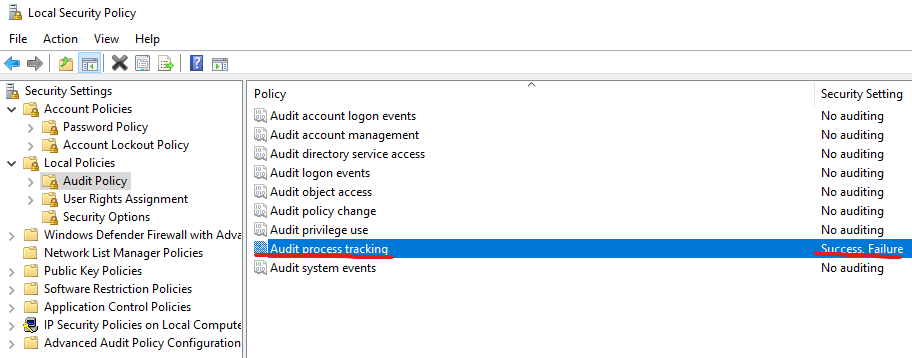
<p>This event is disabled by default, but it <a href="https://learn.microsoft.com/en-us/windows-server/identity/ad-ds/manage/component-updates/command-line-process-auditing">can be enabled via GPO</a>  for domain machines or using the local security policy for stand alone servers (<code class="language-plaintext highlighter-rouge">Local Security Policy</code> &gt; <code class="language-plaintext highlighter-rouge">Local Policy</code> &gt; <code class="language-plaintext highlighter-rouge">Audit Policy</code> &gt; <code class="language-plaintext highlighter-rouge">Audit Process Tracking</code>)</p>

<p><img src="../../assets/post/2024/local-security-policy.png" alt="local-security-policy" /></p>

<p>The XPATH query, which can be used as a filter in the Window Event Viewer, is the following</p>

<div class="language-xml highlighter-rouge"><div class="highlight"><pre class="highlight"><code><span class="nt">&lt;QueryList&gt;</span>
  <span class="nt">&lt;Query</span> <span class="na">Id=</span><span class="s">"0"</span> <span class="na">Path=</span><span class="s">"Security"</span><span class="nt">&gt;</span>
    <span class="nt">&lt;Select</span> <span class="na">Path=</span><span class="s">"Security"</span><span class="nt">&gt;</span>*[System[(EventID=4688)]]
      [EventData
    [Data
        [@Name='TokenElevationType'] and
        (Data='%%1937')
    ]]<span class="nt">&lt;/Select&gt;</span>
  <span class="nt">&lt;/Query&gt;</span>
<span class="nt">&lt;/QueryList&gt;</span>
</code></pre></div></div>

<p>The same query can also be used in a Data Collection Rule in Azure:</p>

<ul>
  <li>Data Source: <code class="language-plaintext highlighter-rouge">Windows Event log</code></li>
  <li>Query Type: <code class="language-plaintext highlighter-rouge">Custom</code></li>
  <li>Xpath Query: <code class="language-plaintext highlighter-rouge">[EventData[Data[@Name='TokenElevationType']and(Data='%%1937')]]</code></li>
</ul>

<p>As indicated in the official documentation below:</p>

<blockquote>
  <p>%%1937: Type 2 is an elevated token with no privileges removed or groups disabled. An elevated token is used when User Account Control is enabled and the user chooses to start the program using Run as administrator. An elevated token is also used when an application is configured to always require administrative privilege or to always require maximum privilege, and the user is a member of the Administrators group.</p>
</blockquote>

<p>this event is also triggered when an application is configured to always require administrative privilege or to always require maximum privilege, and the user is a member of the Administrators group, so <strong>the presence of false positives is possible.</strong></p>]]></content><author><name>Nicola Delfino</name><email>nicola.delfino@outlook.com</email></author><category term="Azure" /><category term="virtual machine" /><category term="log analytics" /><category term="windows" /><category term="event" /><category term="event viewer" /><summary type="html"><![CDATA[in this blog post I show how to intercept the run-as-administrator on a windows machine]]></summary></entry><entry><title type="html">How to install and run noisy on an Azure VM</title><link href="https://nicolgit.github.io/install-and-run-noisy-on-azure-vm/" rel="alternate" type="text/html" title="How to install and run noisy on an Azure VM" /><published>2024-09-04T10:00:00+00:00</published><updated>2024-09-04T10:00:00+00:00</updated><id>https://nicolgit.github.io/install-and-run-noisy-on-azure-vm</id><content type="html" xml:base="https://nicolgit.github.io/install-and-run-noisy-on-azure-vm/"><![CDATA[<p>In this blog post, I show a a couple of scripts that are designed to facilitate the installation of Python and Git and subsequently download the repository of Noisy from GitHub, initiating it with the default configuration, on both Windows and Linux VMs.</p>

<blockquote>
  <p><a href="https://github.com/1tayH/noisy">Noisy</a> is an elegant yet robust Python script that is programmed to generate arbitrary HTTP/DNS traffic.</p>
</blockquote>

<p>I primarily utilize it on my ‘hub-and-spoke playground’ to generate simulated traffic. This facilitates the exploration and manipulation of Azure firewall configurations.</p>

<blockquote>
  <p>the <a href="https://github.com/nicolgit/hub-and-spoke-playground">hub-and-spoke playground</a> is instead a composite collection of BICEP/ARM templates. These templates are designed to be deployed on Azure, forming a hub and spoke network topology that is in alignment with the Microsoft Enterprise scale landing zone reference architecture. This setup serves as an experimental playground for testing and studying.</p>
</blockquote>

<p>The following steps need to be executed from an administrative PowerShell terminal if the machine runs Windows:</p>

<div class="language-powershell highlighter-rouge"><div class="highlight"><pre class="highlight"><code><span class="c">#</span><span class="w">
</span><span class="c"># STEP1 : install python</span><span class="w">
</span><span class="c">#</span><span class="w">
</span><span class="nv">$version</span><span class="w"> </span><span class="o">=</span><span class="w"> </span><span class="s2">"3.12.5"</span><span class="w">
</span><span class="nv">$directory</span><span class="w"> </span><span class="o">=</span><span class="w"> </span><span class="s2">"Python312"</span><span class="w">

</span><span class="nv">$pythonSetupFile</span><span class="w"> </span><span class="o">=</span><span class="w"> </span><span class="s2">"python-"</span><span class="w"> </span><span class="o">+</span><span class="w"> </span><span class="nv">$version</span><span class="w"> </span><span class="o">+</span><span class="w"> </span><span class="s2">"-amd64.exe"</span><span class="w">
</span><span class="nv">$downloadUri</span><span class="w"> </span><span class="o">=</span><span class="w"> </span><span class="s1">'https://www.python.org/ftp/python/'</span><span class="w"> </span><span class="o">+</span><span class="w"> </span><span class="nv">$version</span><span class="w"> </span><span class="o">+</span><span class="w"> </span><span class="s1">'/'</span><span class="w"> </span><span class="o">+</span><span class="w"> </span><span class="nv">$pythonSetupFile</span><span class="w">
</span><span class="n">Invoke-WebRequest</span><span class="w"> </span><span class="nt">-UseBasicParsing</span><span class="w"> </span><span class="nt">-Uri</span><span class="w"> </span><span class="nv">$downloadUri</span><span class="w"> </span><span class="nt">-OutFile</span><span class="w"> </span><span class="nv">$pythonSetupFile</span><span class="w">

</span><span class="nv">$installPythonCommand</span><span class="w"> </span><span class="o">=</span><span class="w"> </span><span class="s1">'.\'</span><span class="w"> </span><span class="o">+</span><span class="w"> </span><span class="nv">$pythonSetupFile</span><span class="w">
</span><span class="n">Start-Process</span><span class="w"> </span><span class="nt">-wait</span><span class="w"> </span><span class="nv">$installPythonCommand</span><span class="w"> </span><span class="nt">-ArgumentList</span><span class="w"> </span><span class="p">@(</span><span class="s1">'/quiet'</span><span class="p">,</span><span class="w"> </span><span class="s1">'InstallAllUsers=1'</span><span class="p">,</span><span class="w"> </span><span class="s1">'PrependPath=1'</span><span class="p">,</span><span class="w"> </span><span class="s1">'Include_test=0'</span><span class="p">)</span><span class="w">

</span><span class="nv">$</span><span class="nn">env</span><span class="p">:</span><span class="nv">PATH</span><span class="w"> </span><span class="o">+=</span><span class="w"> </span><span class="s2">";C:\Program Files\"</span><span class="w"> </span><span class="o">+</span><span class="w"> </span><span class="nv">$directory</span><span class="w"> </span><span class="o">+</span><span class="w"> </span><span class="s2">";"</span><span class="w">

</span><span class="c">#</span><span class="w">
</span><span class="c"># STEP2: install git</span><span class="w">
</span><span class="c">#</span><span class="w">
</span><span class="nv">$gitVersion</span><span class="w"> </span><span class="o">=</span><span class="w"> </span><span class="s2">"2.46.0"</span><span class="w">
</span><span class="nv">$gitSetupFile</span><span class="w"> </span><span class="o">=</span><span class="w"> </span><span class="s2">"Git-"</span><span class="w"> </span><span class="o">+</span><span class="w"> </span><span class="nv">$gitVersion</span><span class="w"> </span><span class="o">+</span><span class="s2">"-64-bit.exe"</span><span class="w">
</span><span class="nv">$gitDownloadUri</span><span class="w"> </span><span class="o">=</span><span class="w"> </span><span class="s2">"https://github.com/git-for-windows/git/releases/download/v"</span><span class="w"> </span><span class="o">+</span><span class="w"> </span><span class="nv">$gitVersion</span><span class="w"> </span><span class="o">+</span><span class="w"> </span><span class="s2">".windows.1/"</span><span class="w"> </span><span class="o">+</span><span class="w"> </span><span class="nv">$gitSetupFile</span><span class="w">
</span><span class="n">Invoke-WebRequest</span><span class="w"> </span><span class="nt">-UseBasicParsing</span><span class="w"> </span><span class="nt">-Uri</span><span class="w"> </span><span class="nv">$gitDownloadUri</span><span class="w"> </span><span class="nt">-OutFile</span><span class="w"> </span><span class="nv">$gitSetupFile</span><span class="w">

</span><span class="nv">$installGitCommand</span><span class="w"> </span><span class="o">=</span><span class="w"> </span><span class="s1">'.\'</span><span class="w"> </span><span class="o">+</span><span class="w"> </span><span class="nv">$gitSetupFile</span><span class="w">
</span><span class="n">Start-Process</span><span class="w"> </span><span class="nt">-wait</span><span class="w"> </span><span class="nv">$installGitCommand</span><span class="w"> </span><span class="nt">-ArgumentList</span><span class="w"> </span><span class="p">@(</span><span class="s1">'/SILENT'</span><span class="p">)</span><span class="w">

</span><span class="nv">$</span><span class="nn">env</span><span class="p">:</span><span class="nv">PATH</span><span class="w"> </span><span class="o">+=</span><span class="w"> </span><span class="s2">"C:\Program Files\Git\cmd;"</span><span class="w">

</span><span class="c">#</span><span class="w">
</span><span class="c"># STEP3: download noisy repo from github</span><span class="w">
</span><span class="c">#</span><span class="w">
</span><span class="n">python</span><span class="w"> </span><span class="nt">-m</span><span class="w"> </span><span class="nx">pip</span><span class="w"> </span><span class="nx">install</span><span class="w"> </span><span class="nx">requests</span><span class="w">
</span><span class="n">git</span><span class="w"> </span><span class="nx">clone</span><span class="w"> </span><span class="nx">https://github.com/1tayH/noisy.git</span><span class="w">
</span><span class="n">cd</span><span class="w"> </span><span class="nx">noisy</span><span class="w">

</span><span class="c">#</span><span class="w">
</span><span class="c"># STEP4: execute noisy </span><span class="w">
</span><span class="c">#</span><span class="w">
</span><span class="n">python</span><span class="w"> </span><span class="nx">noisy.py</span><span class="w"> </span><span class="nt">--config</span><span class="w"> </span><span class="nx">config.json</span><span class="w">

</span></code></pre></div></div>

<p>If you run an Ubuntu machine, you already have <code class="language-plaintext highlighter-rouge">python</code> and <code class="language-plaintext highlighter-rouge">git</code> installed, so only steps 3 and 4 are required, as shown below:</p>

<div class="language-sh highlighter-rouge"><div class="highlight"><pre class="highlight"><code><span class="nb">sudo </span>apt update
<span class="nb">sudo </span>apt upgrade

git clone https://github.com/1tayH/noisy.git
<span class="nb">cd </span>noisy

python3 noisy.py <span class="nt">--config</span> config.json

</code></pre></div></div>]]></content><author><name>Nicola Delfino</name><email>nicola.delfino@outlook.com</email></author><category term="Azure" /><category term="networking" /><category term="hub-and-spoke" /><category term="noisy" /><category term="powershell" /><category term="python" /><category term="git" /><category term="script" /><category term="windows" /><category term="linux" /><category term="shell" /><summary type="html"><![CDATA[a PowerShell and shell script that facilitates the installation of Python and Git, subsequently download the repository of Noisy from GitHub and run it with the default configuration]]></summary></entry><entry><title type="html">Measuring latency between Azure Availability Zones and the impact of an NVA in between V2</title><link href="https://nicolgit.github.io/azure-measuring-latency-across-availability-zones-in-we/" rel="alternate" type="text/html" title="Measuring latency between Azure Availability Zones and the impact of an NVA in between V2" /><published>2024-07-11T10:00:00+00:00</published><updated>2024-07-11T10:00:00+00:00</updated><id>https://nicolgit.github.io/azure-measuring-latency-across-availability-zones-in-we</id><content type="html" xml:base="https://nicolgit.github.io/azure-measuring-latency-across-availability-zones-in-we/"><![CDATA[<p><a href="https://www.techtarget.com/whatis/definition/latency">Latency</a> is an expression of how much time it takes for a data packet to travel from one designated point to another. Ideally, latency will be as close to zero as possible. High network latency can <strong>dramatically increase webpage load times</strong>, interrupt video and audio streams, and render an application unusable. Depending on the application, even a relatively small increase in latency can ruin UX.</p>

<p><a href="https://docs.microsoft.com/en-us/azure/availability-zones/az-overview">Azure availability zones</a> are physically separate locations within each Azure region that are tolerant to local failures. <strong>Azure availability zones are connected by a high-performance network with a round-trip latency of less than 2ms</strong>.</p>

<p>In Azure, each data center is assigned to a physical (availability) zone. Physical zones are mapped to logical (availability) zones in your Azure subscription. You can design resilient solutions by using Azure services that use availability zones.</p>

<p>A <a href="https://azure.microsoft.com/en-us/blog/announcing-the-general-availability-of-proximity-placement-groups/">proximity placement group</a> is an Azure Virtual Machine logical grouping capability that you can use to decrease the inter-VM network latency associated with your applications. When the VMs are deployed within the same proximity placement group, they are physically located as close as possible to each other.</p>

<p>Understanding the latency implications of different network configurations is essential when designing a high-availability and resilient architecture. It is crucial to consider the impact of latency on application performance and user experience. By measuring latency between virtual machines in various network setups, you can assess the effectiveness of different configurations. This knowledge can help you make informed decisions when building your architecture.</p>

<p>In this blog post I measure the latency between virtual machines deployed in Azure’s <strong>West Europe region</strong> in the following configurations:</p>

<ul>
  <li>same v-net, same availability zone, same proximty placement group</li>
  <li>same v-net, across availability zones</li>
  <li>multiple v-nets (in peering), same availability zone</li>
  <li>multiple v-nets (in peering), across availability zones</li>
  <li>multiple v-nets connected in a Hub &amp; Spoke topology and Routing via <a href="https://docs.microsoft.com/en-us/azure/vpn-gateway/vpn-gateway-about-vpngateways">Azure Virtual Network Gateway</a></li>
  <li>multiple v-nets connected in a Hub &amp; Spoke topology and Routing via <a href="https://docs.microsoft.com/en-us/azure/firewall/overview">Azure Firewall</a></li>
</ul>

<p>Rather than the absolute values, my focus is on assessing the impact in terms of latency of various network configurations.</p>

<p>To measure latency, I used <a href="https://github.com/microsoft/latte">Latte</a>, a Windows network latency benchmark tool available on GitHub. You can find more information on how to measure network latency between Azure VMs using Latte (on Windows) and SOCKPERF (on Linux) at <a href="https://learn.microsoft.com/en-us/azure/virtual-network/virtual-network-test-latency?tabs=windows">this link</a>.</p>

<blockquote>
  <p>The <a href="https://github.com/nicolgit/hub-and-spoke-playground"><strong>Azure hub and spoke playground</strong></a> is a GitHub repository where you can find a reference network architecture that I use as a common base to implement configurations and test networking and connectivity scenarios. I have also used it here as a starting point to build the lab used in this post.</p>
</blockquote>

<h1 id="scenario-1---one-virtual-network">Scenario 1 - one virtual network</h1>

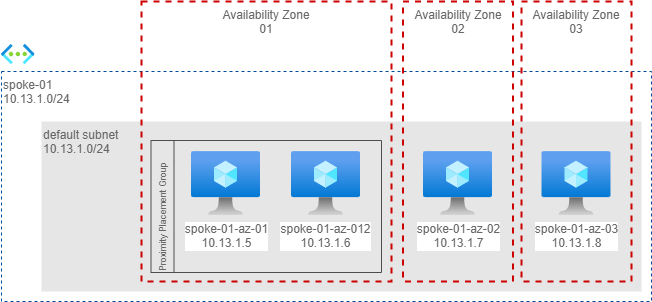
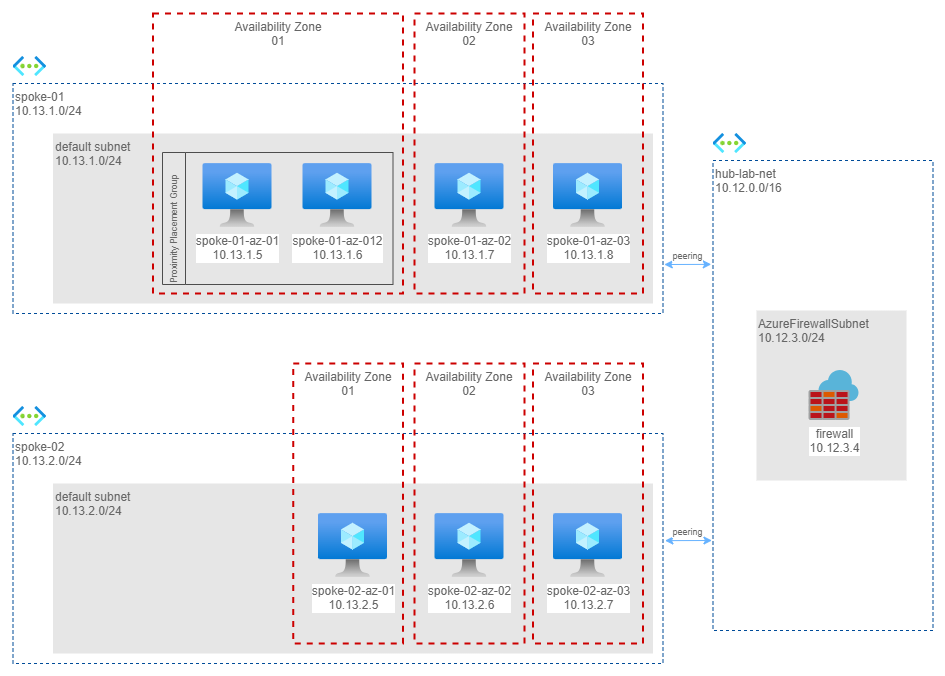
<p>In this scenario I have a calling machine in one availability zone and 3 additional machines each in a different availability zone. In availability zone 1 I have also placed both machines in the same proximity placement group to have the best possible latency, as shown below.</p>

<p><img src="../../assets/post/2024/latency/latency-scenario-1.png" alt="same network" /></p>

<p>Here the measures from <code class="language-plaintext highlighter-rouge">spoke01-az-01</code> (Availability Zone 1).</p>

<table>
  <thead>
    <tr>
      <th>Command</th>
      <th>Availability Zone</th>
      <th>Latency (usec)</th>
    </tr>
  </thead>
  <tbody>
    <tr>
      <td><code class="language-plaintext highlighter-rouge">latte -c -a 10.13.1.6:80 -i 60000</code></td>
      <td>1</td>
      <td><strong>65.15</strong></td>
    </tr>
    <tr>
      <td><code class="language-plaintext highlighter-rouge">latte -c -a 10.13.1.7:80 -i 60000</code></td>
      <td>2</td>
      <td><strong>119.87</strong></td>
    </tr>
    <tr>
      <td><code class="language-plaintext highlighter-rouge">latte -c -a 10.13.1.8:80 -i 60000</code></td>
      <td>3</td>
      <td><strong>1199.54</strong></td>
    </tr>
  </tbody>
</table>

<p>Takeaways:</p>

<ul>
  <li>The Proximity Placement Group performs exceptionally well, with latency well below 2ms (only 65 microseconds!)</li>
  <li>When communicating between availability zones, I consistently measured an average latency below 2ms.</li>
  <li>The significant difference in latency between communication from AZ1 to AZ2 and AZ1 to AZ3 is likely due to the non-uniform distance between the three Availability Zones in the West Europe region. These three zones are positioned in a highly pronounced isosceles triangle around Amsterdam.</li>
</ul>

<h1 id="scenario-2---two-virtual-networks-in-peering">Scenario 2 - two virtual networks in peering</h1>

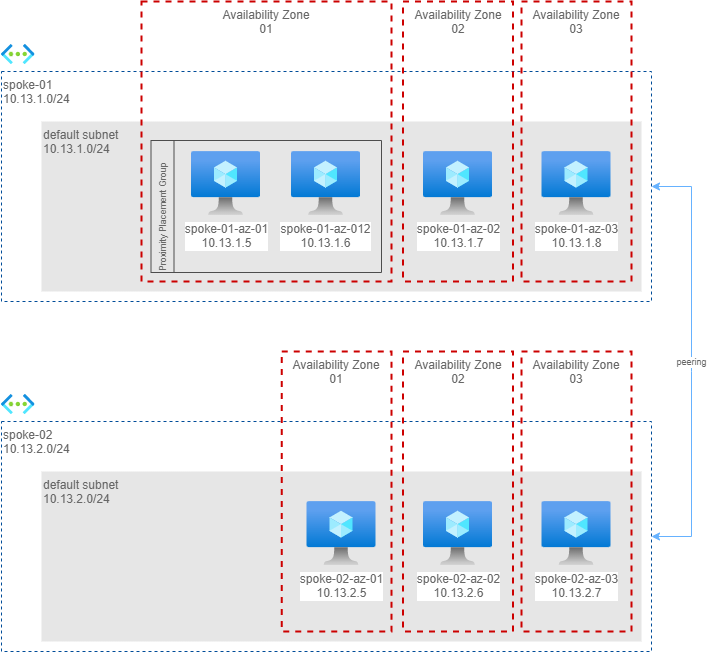
<p>In this scenario I have measured the impact of a network peering. I have created 3 more machines, in 3 availability zones, on another network, in peering.</p>

<p><img src="../../assets/post/2024/latency/latency-scenario-2.png" alt="peering" /></p>

<p>Here the measures from <code class="language-plaintext highlighter-rouge">spoke01-az-01</code> (availability zone 1) to machines in another virtual network in peering.</p>

<table>
  <thead>
    <tr>
      <th>Command</th>
      <th>Availability Zone</th>
      <th>Latency (usec)</th>
    </tr>
  </thead>
  <tbody>
    <tr>
      <td><code class="language-plaintext highlighter-rouge">latte -c -a 10.13.2.5:80 -i 60000</code></td>
      <td>1</td>
      <td><strong>57.92</strong></td>
    </tr>
    <tr>
      <td><code class="language-plaintext highlighter-rouge">latte -c -a 10.13.2.6:80 -i 60000</code></td>
      <td>2</td>
      <td><strong>112.22</strong></td>
    </tr>
    <tr>
      <td><code class="language-plaintext highlighter-rouge">latte -c -a 10.13.2.7:80 -i 60000</code></td>
      <td>3</td>
      <td><strong>1062.29</strong></td>
    </tr>
  </tbody>
</table>

<p>Takeaways:</p>
<ul>
  <li>Network peering does not add any measurable overhead.</li>
  <li>The latency between two VMs in AZ1, even if they are not in the same proximity group, is almost equal to or even better than the latency between two VMs in the same proximity group. It is possible that <code class="language-plaintext highlighter-rouge">spoke-02-az-01</code> has been provisioned very close to <code class="language-plaintext highlighter-rouge">spoke-01-az-01</code>, although it is not guaranteed.</li>
</ul>

<h1 id="scenario-3---two-virtual-networks-in-hs-configuration-with-a-virtual-network-gateway-in-between">Scenario 3 - two virtual networks in H&amp;S configuration with a Virtual Network Gateway in between</h1>

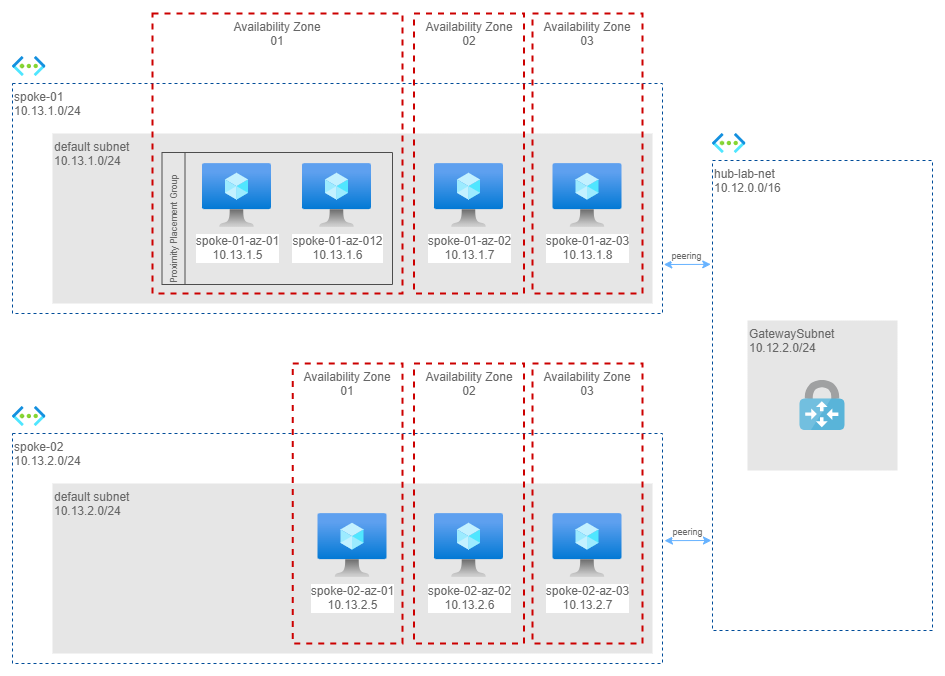
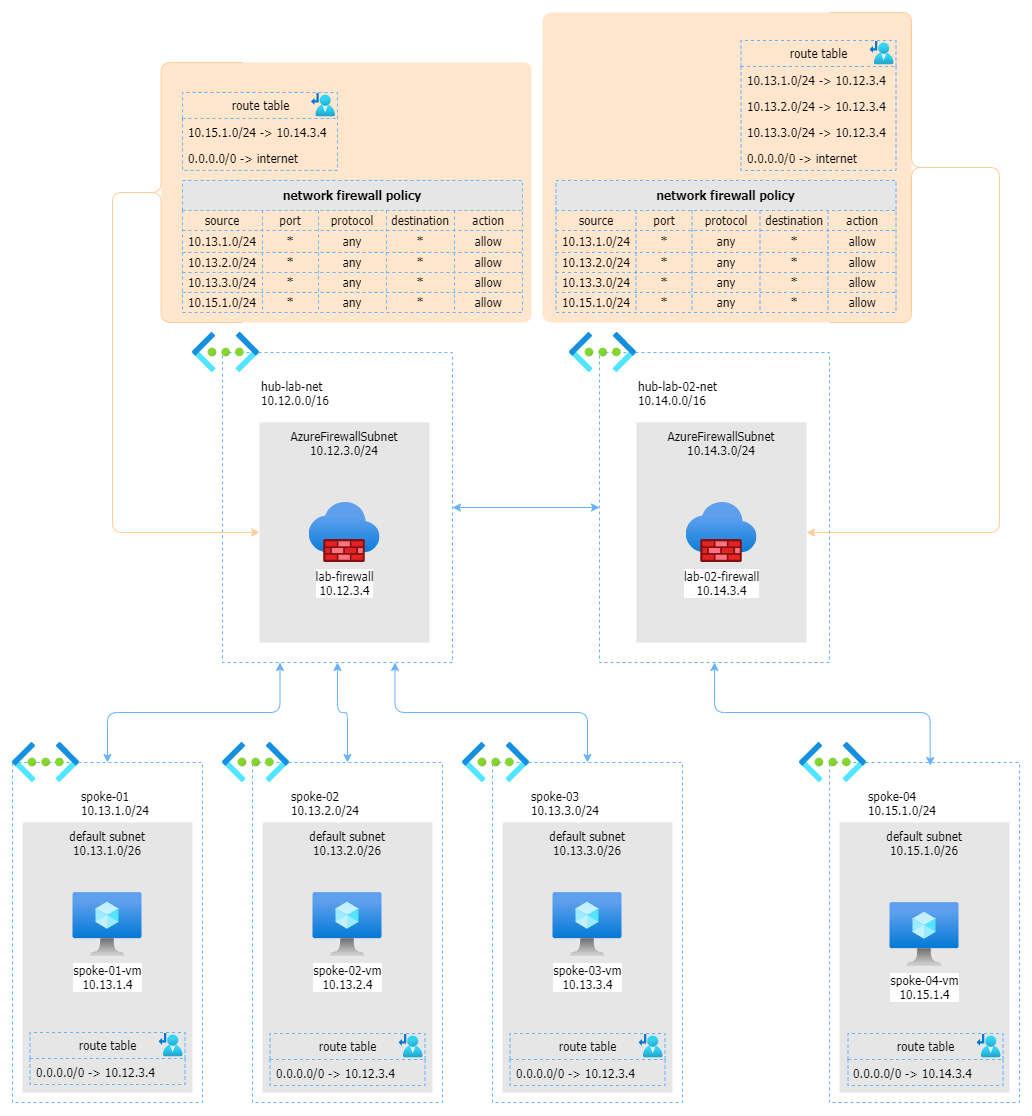
<p>In this scenario I moved to a more classic configuration: I eliminated peering and routed traffic through a central hub and an Azure Virtual Network Gateway.</p>

<p><img src="../../assets/post/2024/latency/latency-scenario-3.png" alt="hub-and-spoke" /></p>

<p>Here the measures from <code class="language-plaintext highlighter-rouge">spoke01-az-01</code> (availability zone 1) to machines in another virtual network via an Azure Virtual Network Gateway in the Hub Network.</p>

<table>
  <thead>
    <tr>
      <th>Command</th>
      <th>Availability Zone</th>
      <th>Latency (usec)</th>
    </tr>
  </thead>
  <tbody>
    <tr>
      <td><code class="language-plaintext highlighter-rouge">latte -c -a 10.13.2.5:80 -i 60000</code></td>
      <td>1</td>
      <td>887.56</td>
    </tr>
    <tr>
      <td><code class="language-plaintext highlighter-rouge">latte -c -a 10.13.2.6:80 -i 60000</code></td>
      <td>2</td>
      <td>957.46</td>
    </tr>
    <tr>
      <td><code class="language-plaintext highlighter-rouge">latte -c -a 10.13.2.7:80 -i 60000</code></td>
      <td>3</td>
      <td>2124.09</td>
    </tr>
  </tbody>
</table>

<p>Takeaways</p>

<ul>
  <li>Latency increased up to <strong>0.8/2.1ms</strong> because each packet has to cross 2 peerings and a virtual appliance (Azure Virtual Network Gateway).</li>
  <li>Staying in the same availability zone still has a positive impact on latency. Communication between AZ1 and AZ2 increases latency by a small amount (0.1ms), but in the case of AZ3, latency reaches just over 2ms. However, we are still within the limits stated by Microsoft, as the guaranteed 2ms latency does not account for the presence of a virtual appliance in between.</li>
</ul>

<h1 id="scenario-4---two-virtual-networks-in-hs-configuration-with-an-azure-firewall-in-between">Scenario 4 - two virtual networks in H&amp;S configuration with an Azure Firewall in between</h1>

<p>In this last scenario I implemented the <a href="https://docs.microsoft.com/en-us/azure/architecture/reference-architectures/hybrid-networking/hub-spoke">reference architecture described in the cloud adoption framework</a>, that is a hub and spoke, with an Azure Firewall to control all the traffic.</p>

<p><img src="../../assets/post/2024/latency/latency-scenario-4.png" alt="hub and spoke" /></p>

<p>Here the measures from <code class="language-plaintext highlighter-rouge">spoke01-az-01</code> (availability zone 1) to machines in another virtual network and different availability zones, via Azure Firewall in the Hub Network.</p>

<table>
  <thead>
    <tr>
      <th>Command</th>
      <th>Availability Zone</th>
      <th>Latency (usec)</th>
    </tr>
  </thead>
  <tbody>
    <tr>
      <td><code class="language-plaintext highlighter-rouge">latte -c -a 10.13.2.5:80 -i 60000</code></td>
      <td>1</td>
      <td>2418.44</td>
    </tr>
    <tr>
      <td><code class="language-plaintext highlighter-rouge">latte -c -a 10.13.2.6:80 -i 60000</code></td>
      <td>2</td>
      <td>2605.39</td>
    </tr>
    <tr>
      <td><code class="language-plaintext highlighter-rouge">latte -c -a 10.13.2.7:80 -i 60000</code></td>
      <td>3</td>
      <td>1575.93</td>
    </tr>
  </tbody>
</table>

<p>Takeaways</p>

<ul>
  <li>The latency with the Azure Firewall is comparable to that of the Azure Virtual Network Gateway in between.</li>
  <li>There are still situations where the latency is below 2ms or slightly higher (2.4/2.6ms).</li>
  <li>The transit time through the firewall can also vary depending on the capabilities enabled on the server and the number or policy rules that the traffic crosses.</li>
</ul>

<h1 id="final-thoughts">Final thoughts</h1>

<ul>
  <li>Whenever possible, <strong>always use Proximity Placement Groups</strong> to achieve lower latency.</li>
  <li>Traffic between zones has been consistently measured to be <strong>below 2ms</strong>.</li>
  <li>Peerings have minimal impact on latency.</li>
  <li>The hub-and-spoke architecture can have an impact on latency, but by using either a VPN Gateway or, preferably, an Azure Firewall as a virtual appliance, the latency remains almost within the 2ms threshold.</li>
</ul>]]></content><author><name>Nicola Delfino</name><email>nicola.delfino@outlook.com</email></author><category term="Azure" /><category term="networking" /><category term="hub-and-spoke" /><category term="latency" /><category term="availability-zone" /><category term="azure firewall" /><category term="peering" /><category term="Proximity Placement Group" /><category term="Virtual Network Gateway" /><summary type="html"><![CDATA[In this post I measure the latency between virtual machines in various network configurations on Azure]]></summary></entry><entry><title type="html">Network topologies for Azure batch transcription Speech Service</title><link href="https://nicolgit.github.io/network-topologies-for-azure-batch-trancription-service/" rel="alternate" type="text/html" title="Network topologies for Azure batch transcription Speech Service" /><published>2024-04-26T10:00:00+00:00</published><updated>2024-04-26T10:00:00+00:00</updated><id>https://nicolgit.github.io/network-topologies-for-azure-batch-trancription%20service</id><content type="html" xml:base="https://nicolgit.github.io/network-topologies-for-azure-batch-trancription-service/"><![CDATA[<p>Among the many services offered by Microsoft Azure, the Azure Speech Services stands out as one of the most innovative and powerful tools for businesses and developers. This service provides APIs that enable developers to add speech-related functionalities into their applications, thereby enhancing their capabilities and user experience.</p>

<blockquote>
  <p><a href="https://learn.microsoft.com/en-us/azure/ai-services/speech-service/overview">Azure Speech Services</a> is a comprehensive suite of cloud-based speech services offered by Microsoft Azure. This suite includes a range of services such as speech-to-text, text-to-speech, speech translation, and speaker recognition. These services harness the power of advanced machine learning algorithms to convert spoken language into written text, generate natural human-like speech from text, translate speech into different languages, and identify speakers based on their unique voice characteristics. Azure Speech Services is designed to handle both real-time and batch processing, making it suitable for a wide variety of applications.</p>
</blockquote>

<p>An integral part of Azure Speech Services is the <a href="https://learn.microsoft.com/en-us/azure/ai-services/speech-service/batch-transcription">Azure Batch Transcription Service</a>(ABTS). This service is specifically designed to transcribe large volumes of audio data into text. It takes in audio files as input and outputs a detailed transcription of the spoken content in the audio. Azure Batch Transcription Service is particularly useful in scenarios where businesses need to transcribe large amounts of audio data quickly and accurately.</p>

<p>In the context of Azure Batch Transcription Service, network topologies play a critical role in ensuring data privacy and sovereignty. Network topologies determine the path that data travels from the source to the Azure cloud and back. This path can have significant implications for data privacy and sovereignty, especially in scenarios where data needs to <strong>cross international borders</strong>. By carefully designing the network topology, businesses can ensure that their data remains within specific geographical boundaries, thereby complying with local data protection regulations and maintaining the trust of their customers. Moreover, a well-designed network topology can also enhance the performance of the Azure Batch Transcription Service by <strong>reducing latency and increasing throughput</strong>.</p>

<p><strong>In this post, I show various networking topologies related to this field, highlighting key features and points of reflection.</strong></p>

<h1 id="a-typical-workflow">A typical workflow</h1>

<p>An automatic transcription workflow that uses Azure Batch Transcription Service typically consists of the following steps:</p>
<ol>
  <li>Upload audio files to an <a href="https://learn.microsoft.com/en-us/azure/storage/blobs/storage-blobs-introduction">Azure Storage container</a>.</li>
  <li>Submit the transcription job to ABTS with parameters such as the audio file URLs, the transcription language, and the transcription model.</li>
  <li>ABTS asynchronously accesses the storage that contains audio files, reads them, and produces the transcriptions.</li>
  <li>Once finished, ABTS saves the transcription to destination Azure Storage container.</li>
  <li>While ABTS runs, the customer can check the transcription status and wait until it completes.</li>
  <li>The customer retrieves the resulting transcription from the destination Azure Storage container.</li>
</ol>

<h1 id="scenario-1-public-internet">Scenario 1: Public internet</h1>
<p>In this scenario, I show the default configuration, where ABTS reads data from a storage account that is publicly exposed on the internet, and dumps the results in a storage managed by the service itself, therefore <strong>outside the customer’s Azure subscription</strong>.</p>

<p><img src="/assets/post/2024/Speech-Service/scenario1.png" alt="scenario 1" /></p>

<p><em>download drawio version of this schema <a href="/assets/post/2024/Speech-Service/Azure-Speech-Service-Architecture.drawio">from this link</a>.</em></p>

<p>In this case, even though confidentiality is guaranteed by managed access through SAS Tokens, <strong>the storage and services are all exposed on the internet</strong>, thus potentially vulnerable.</p>

<ul>
  <li>how create a batch transcription <a href="https://learn.microsoft.com/en-us/azure/ai-services/speech-service/batch-transcription-create?pivots=speech-cli">https://learn.microsoft.com/en-us/azure/ai-services/speech-service/batch-transcription-create?pivots=speech-cli</a></li>
  <li>Storage SAS token: <a href="https://learn.microsoft.com/en-us/azure/storage/common/storage-sas-overview">https://learn.microsoft.com/en-us/azure/storage/common/storage-sas-overview</a></li>
</ul>

<h1 id="scenario-2-customers-destination-storage">Scenario 2: Customer’s destination storage</h1>
<p>In this scenario, entirely analogous to the first one, a destination Storage Account is created on the customer’s subscription. At the end of the operation, ABTS copy the contents directly to this storage.</p>

<p><img src="/assets/post/2024/Speech-Service/scenario2.png" alt="scenario 2" /></p>

<p><em>download drawio version of this schema <a href="/assets/post/2024/Speech-Service/Azure-Speech-Service-Architecture.drawio">from this link</a>.</em></p>

<p>Also in this case, confidentiality is guaranteed exclusively by the SAS tokens of the Storage Account, <strong>but all communication occurs through the internet</strong> to ensure both the customer and the Azure service can access the data they need to work on.</p>

<ul>
  <li>Specify a destination container URL: <a href="https://learn.microsoft.com/en-us/azure/ai-services/speech-service/batch-transcription-create?pivots=speech-cli#specify-a-destination-container-url">https://learn.microsoft.com/en-us/azure/ai-services/speech-service/batch-transcription-create?pivots=speech-cli#specify-a-destination-container-url</a></li>
</ul>

<h1 id="scenario-3-using-private-endpoint">Scenario 3: Using Private endpoint</h1>
<p>In this scenario, all the resources involved (VM, storage and ABTS) are exposed through private endpoints on a customer’s internal network.</p>

<p><img src="/assets/post/2024/Speech-Service/scenario3.png" alt="scenario 3" /></p>

<p><em>download drawio version of this schema <a href="/assets/post/2024/Speech-Service/Azure-Speech-Service-Architecture.drawio">from this link</a>.</em></p>

<p>Compared to the previous scenario, the upload of data to the storage and the download of results occur through a secure channel internal to the customer’s subscription. However, the storage accounts must remain publicly accessible via the internet to allow ABTS to function properly.</p>

<ul>
  <li>Speech Service - Private Endpoint: <a href="https://learn.microsoft.com/en-us/azure/ai-services/speech-service/speech-services-private-link?tabs=portal">https://learn.microsoft.com/en-us/azure/ai-services/speech-service/speech-services-private-link?tabs=portal</a></li>
  <li>Azure Storage - Private endpoint: <a href="https://learn.microsoft.com/en-us/azure/storage/common/storage-private-endpoints">https://learn.microsoft.com/en-us/azure/storage/common/storage-private-endpoints</a></li>
</ul>

<h1 id="scenario-4-use-the-bring-your-own-storage-byos-speech-resource-for-speech-to-text">Scenario 4: Use the Bring your own storage (BYOS) Speech resource for speech to text</h1>

<blockquote>
  <p>this service is currently in <strong>preview</strong>: to request access <a href="https://aka.ms/cogsvc-cmk">use this link</a></p>
</blockquote>

<p><strong>Bring your own storage</strong> (BYOS) is an Azure AI technology for customers who have high requirements for data security and privacy. The core of the technology is the ability to <strong>associate an Azure Storage account, that the user owns and fully controls with the Speech resource</strong>. The Speech resource then uses this storage account for storing different artifacts related to the user data processing, instead of storing the same artifacts within the Speech service premises as it is done in the regular case. This approach allows using all set of security features of Azure Storage account, including encrypting the data with the Customer-managed keys, using Private endpoints to access the data, etc.</p>

<p>In BYOS scenarios, <strong>all traffic between the Speech resource and the Storage account is maintained using Azure global network</strong> (but all resource must be in the same region), in other words all communication is performed using private network, completely <strong>bypassing public internet</strong>. Speech resource in BYOS scenario is using Azure Trusted services mechanism to access the Storage account, relying on <a href="https://learn.microsoft.com/en-us/entra/identity/managed-identities-azure-resources/overview">System-assigned managed identities</a> as a method of authentication, and <a href="https://learn.microsoft.com/en-us/azure/role-based-access-control/overview">Role-based access control</a> (RBAC) as a method of authorization.</p>

<p><img src="/assets/post/2024/Speech-Service/scenario4.png" alt="scenario 4" /></p>

<p><em>download drawio version of this schema <a href="/assets/post/2024/Speech-Service/Azure-Speech-Service-Architecture.drawio">from this link</a>.</em></p>

<p>Consider the following rules when planning BYOS-enabled Speech resource configuration:</p>

<ul>
  <li>Speech resource can be BYOS-enabled <strong>only during creation</strong>. Existing Speech resource can’t be converted to BYOS-enabled. BYOS-enabled Speech resource can’t be converted to the “conventional” (non-BYOS) one.</li>
  <li>Storage account association with the Speech resource is <strong>declared during the Speech resource creation</strong>. It can’t be changed later. That is, you can’t change what Storage account is associated with the existing BYOS-enabled Speech resource. To use another Storage account, you have to create another BYOS-enabled Speech resource.</li>
  <li>When creating a BYOS-enabled Speech resource, you can use an existing Storage account or create one automatically during Speech resource provisioning (the latter is valid only when using Azure portal).
One Storage account can be associated with many Speech resources. We recommend using one Storage account per one Speech resource.</li>
  <li>It is reccomended that Storage account and the related BYOS-enabled Speech service are <strong>located in the same region</strong>.</li>
</ul>

<p>Setup BYOS: <a href="https://learn.microsoft.com/en-us/azure/ai-services/speech-service/bring-your-own-storage-speech-resource?tabs=azure-cli#byos-enabled-speech-resource-basic-rules">https://learn.microsoft.com/en-us/azure/ai-services/speech-service/bring-your-own-storage-speech-resource?tabs=azure-cli#byos-enabled-speech-resource-basic-rules</a></p>]]></content><author><name>Nicola Delfino</name><email>nicola.delfino@outlook.com</email></author><category term="Azure" /><category term="networking" /><category term="Azure AI Services" /><category term="batch" /><category term="transcription" /><category term="Azure AI Speech services" /><summary type="html"><![CDATA[Discussion on networking topologies related to Azure batch translation service]]></summary></entry><entry><title type="html">Moving a virtual machine between availability zones in Azure</title><link href="https://nicolgit.github.io/Moving-a-virtual-machine-between-availability-zones-in-Azure/" rel="alternate" type="text/html" title="Moving a virtual machine between availability zones in Azure" /><published>2023-10-10T10:00:00+00:00</published><updated>2023-10-10T10:00:00+00:00</updated><id>https://nicolgit.github.io/Moving-a-virtual-machine-between-availability-zones-in-Azure</id><content type="html" xml:base="https://nicolgit.github.io/Moving-a-virtual-machine-between-availability-zones-in-Azure/"><![CDATA[<p>In this blog post, I show how to handle 2 typical virtual machine move operations on Azure.</p>

<h1 id="move-a-vm-from-no-infrasstructure-redundancy-to-a-specific-availability-zone">Move a VM from “no infrasstructure redundancy” to a specific Availability Zone</h1>

<p>This scenario is supported by the Azure portal. Let’s start from a VM with the following characteristics:</p>

<ul>
  <li>Name: <code class="language-plaintext highlighter-rouge">machine-01</code></li>
  <li>Linux</li>
  <li>OS disk LRS 30Gb</li>
</ul>

<p>to move this VM to a specific Availability Zone, from Azure portal go to:</p>

<ul>
  <li><code class="language-plaintext highlighter-rouge">machine-01</code> &gt; availability + scaling &gt; Availability Zones &gt; get Started</li>
  <li>select Target Availability Zone &gt; <code class="language-plaintext highlighter-rouge">Zone 1</code></li>
</ul>

<p>in this migration:</p>

<ul>
  <li>A new virtual machine is created</li>
  <li>New NIC is created along with the zonal VM</li>
  <li>you can optionally change target virtual network and subnet</li>
  <li>VM will be stopped during the process to avoid data loss. There will be a brief downtime of few minutes and copy of VM(s) will be created in the target zone</li>
  <li>the machine created will be in another resource group</li>
</ul>

<p>at the end of the moving process, you can safetly delete the source machine.</p>

<h1 id="move-a-vm-from-an-availability-zone-to-another">Move a VM from an availability zone to another</h1>

<p>This is unsupported.</p>

<p>Transform a VM from “availability zone xx” to “no infrastructure redundancy” is also not supported.</p>

<p>If you need to change availability zone to a VM you can follow these steps:</p>

<ul>
  <li>Turn-off source VM</li>
  <li>Create a full snapshot (ZRS) of the OS disk</li>
  <li>Create a managed disk from the snapshot, in the availability zone target</li>
  <li>Select the OS disk created, and select [create VM] from the disk</li>
</ul>

<p>More information:</p>
<ul>
  <li>Availiability Zones: https://learn.microsoft.com/en-gb/azure/reliability/availability-zones-overview?tabs=azure-cli</li>
  <li>https://learn.microsoft.com/en-us/azure/virtual-machines/attach-os-disk?tabs=portal</li>
</ul>]]></content><author><name>Nicola Delfino</name><email>nicola.delfino@outlook.com</email></author><category term="Azure" /><category term="networking" /><category term="azure virtual machine" /><category term="region" /><category term="availability zone" /><summary type="html"><![CDATA[In this blog post, I show how to handle some typical virtual machine move operations on Azure.]]></summary></entry></feed>