
tl;dr If you’re interested in the project itself and do not want to waste your time reading this post 😅, here is the GitHub repo and here is the Proximity project live.
For me, open source is not a side activity, it’s a deliberate part of how I practice coding and architecture.
In the enterprise environments I usually work in as a Chief Cloud & AI Architect, architecture is often constrained by existing platforms, organizational inertia, legacy decisions, political trade-offs.
Those constraints are real — but they also limit experimentation.
An open source side project gives me a different space, a place with no hidden assumptions, no artificial deadlines, no “we’ll fix it later in production” — every decision can stand on its own.
The Proximity project started exactly this way: inspired by a post I found on reddit, it is an open source tool that visualizes walking-distance isochrones from public transport stops (trains, metro, trolleys, buses) across multiple metropolitan areas and a controlled environment that allows me to apply patterns and learn to use frameworks that would otherwise remain somewhat sterile without a clear purpose.
The objective of this post is to show why I treat Proximity as more than a toy project: it is a sandbox for practicing real cloud architecture, experimenting with new frameworks, and stress-testing patterns like serverless, IaC, and AI-assisted development in a space where I can make deliberate, opinionated decisions end to end.
The project
When talking about public transport accessibility, we often rely on simplified assumptions.
- Stops are either “served” or “not served”.
- Areas are either “covered” or “uncovered”.
In practice, accessibility is rarely binary.
What really affects usability is not the presence of a stop, but how far people can realistically walk to reach it. Five minutes on a flat sidewalk is very different from five minutes uphill.
Two stops 300 meters apart can serve very different areas.
Straight-line distance doesn’t represent how people move.
What matters is the REAL walking time: Isochrones model this more accurately by showing where you can actually get to within a given walking time.
The Proximity project uses walking-distance isochrones to make this visible. This problem looks simple on the surface, but it quickly becomes non-trivial when you scale it:
- many cities
- many stops
- many transport types
- multiple distance thresholds
- interactive visualization on desktop and mobile browsers
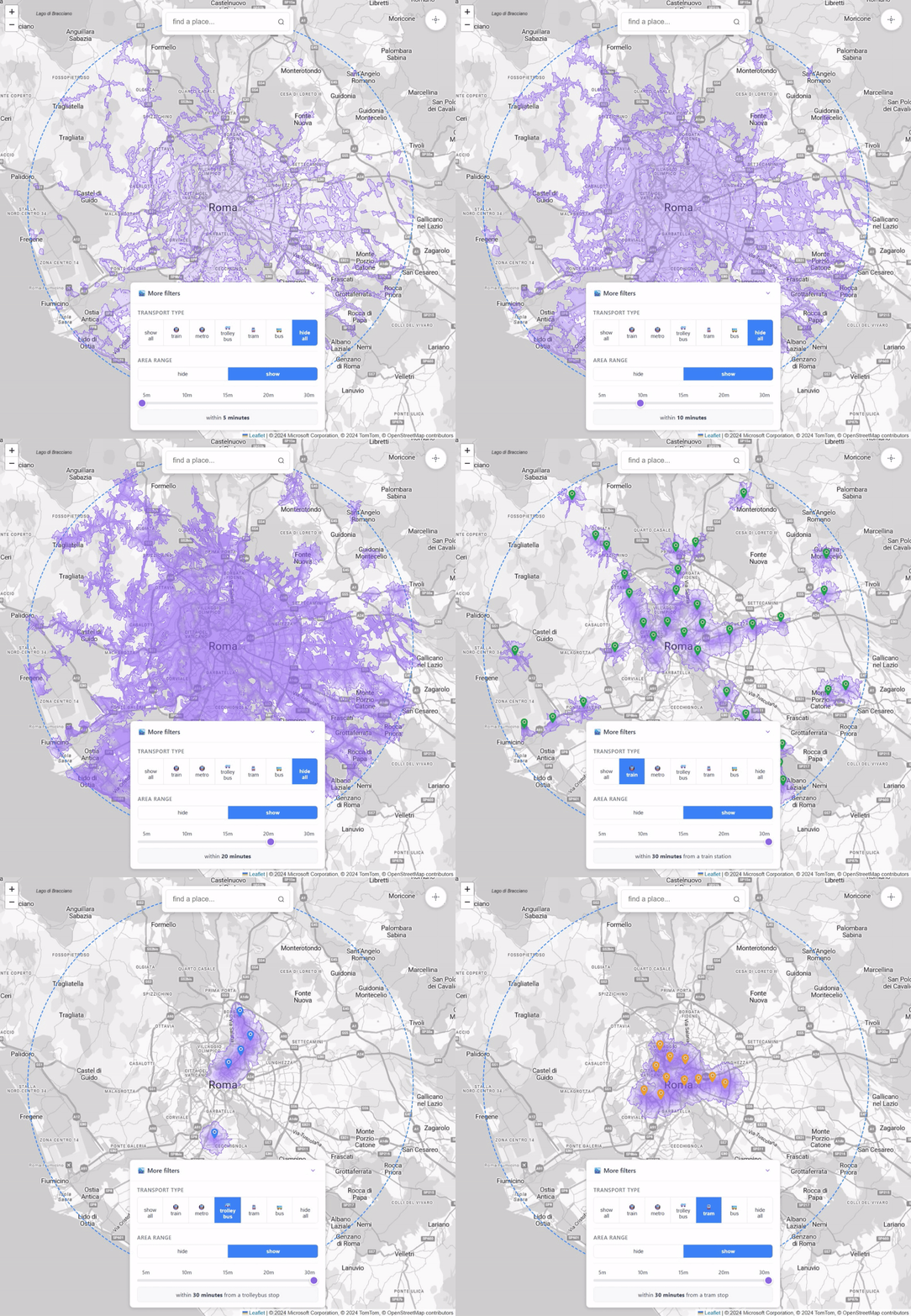
It forces you to think about data modeling, computation cost, caching, and the frameworks to use.
When I started building, the goal seemed simple: compute walking-distance isochrones for multiple transport stops and display them interactively.
As the project grew, scaling it across cities, transport types, and interactive maps forced deliberate architectural choices.
The Frontend
SPA with Vue and TypeScript:
- TypeScript helps catch errors at compile-time, making the codebase more robust and maintainable than plain JavaScript.
- Vue provides a reactive, component-based framework that is lightweight, easy to reason about, and ideal for building interactive map interfaces.
Maps with Leaflet:
- Leaflet is fast, flexible, and lightweight. It integrates well with tile-based rendering and supports vector overlays and pin points, which I use to show isochrones.
Deployment to a Azure Static Web Apps:
- Benefits: fast global distribution, low cost, automatic HTTPS, and seamless integration with GitHub CI/CD.
- The SPA model pairs perfectly with static hosting, as most logic runs client-side while fetching precomputed data.
The Backend
Azure Functions in C#:
- C# provides strong typing and mature tooling, which helps maintain reliability in serverless code.
- Serverless functions are cheap, scale automatically, and fit perfectly for event-driven tasks like serving requests for metadata or trigger-based operations.
Data storage and caching
On the data side:
- Areas metadata are stored in Azure Table Storage
- Isochrone JSON blobs are stored in Azure Blob Storage with CDN-friendly headers
Benefits: fast, cheap, globally distributed, and easy to update. Most of the data is relatively static, so caching reduces latency and costs.
Isochrone computation
Real-time computation of walking-distance isochrones is too expensive: iterating over the pedestrian network for thousands of stops and stations would be slow. So I opted for offline precomputation using a CLI generator written in C#.
In this setup:
- Mapbox APIs handle the heavy lifting of isochrone calculation
- OpenStreetMap data is retrieved through the Overpass API to collect the stops to analyze
- All results are stored in Blob Storage, ready to be served by the SPA
This approach balances accuracy, performance, and cost without compromising interactivity.
Deploy on Azure
Proximity isn’t just about computing isochrones and displaying them. Running it reliably and securely in the cloud requires careful architectural choices.
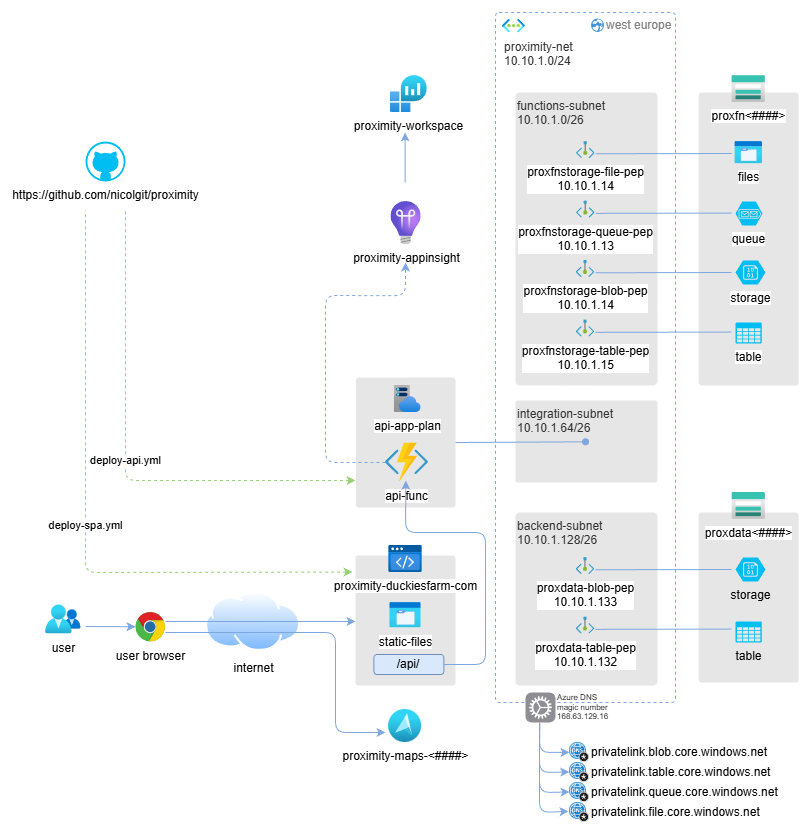
Architecture deployed on Azure
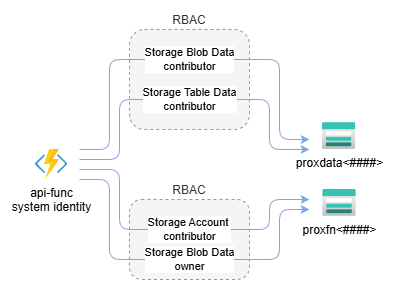
Azure function system identity RBAC
Infrastructure as Code (IaC)
All resources are deployed using Infrastructure-as-Code written in Bicep. Benefits:
- Reproducibility: environments can be recreated consistently
- Traceability: every change is tracked in source control
- Ease of iteration: no manual clicks, everything is declarative
Azure network isolation
- All backend services run behind a private endpoint in an isolated Azure virtual network.
- Frontend accesses backend securely through this private link.
- System-assigned identities are used for authentication between services, eliminating the need for secrets in code.
Advantages:
- Strong security posture by default
- Minimizes attack surface
- Simplifies credential management and compliance
CI/CD with GitHub Actions
Both frontend and backend are deployed automatically via 2 GitHub Actions:
- Builds and deploys SPA to Azure Static Web Apps
- Builds and deploys Azure Functions
Benefits:
- Fully automated workflow
- Fast and repeatable deployments
- Low operational overhead
Key trade-offs and deliberate architectural choices
- Avoided fully dynamic computation → would be too slow and costly
- Chose serverless → cheap, scalable, low ops overhead
- Avoided monolithic backend → caching and offline computation are simpler with a clean separation
- Opted for TypeScript + Vue → maintainable frontend without unnecessary complexity
- Leaflet → lightweight and flexible for map visualization
Each choice reflects a trade-off between simplicity, performance, and maintainability.
Building Proximity was a technically simple idea on paper, but the process taught me many lessons — both about architecture and about using AI-assisted development.
Highlights
- VS Code + Copilot accelerated development enormously.
- Writing C# code I already knew well, I went from hours to minutes on many tasks.
- For Vue and Leaflet, which were completely new to me, Copilot helped me scaffold components and learn the development paradigm quickly.
- Rapid prototyping and iteration became possible: I could test frontend-backend interactions without blocking myself on unfamiliar frameworks.
- Hands-on experience with new libraries: I now have a solid foundation in Vue and Leaflet, which will inform future projects.
Lowlights
- At first, I let AI drive too much of the frontend implementation because I wanted to see what it would produce.
- Result: some code is verbose, repetitive, or not as clean as I would have written manually.
- Lesson: when using AI for new technologies, prepare focused, precise prompts for better results.
- Refactoring is still needed: even with AI, improving structure or fixing repeated patterns takes time.
- Proper upfront design reduces refactoring and ensures maintainable code.
Key takeaways
- AI can accelerate coding and learning, but it does not replace careful planning.
- Spend time upfront defining prompts, patterns, and architecture, especially with unfamiliar technologies.
- Iterating on real projects is the fastest way to learn frameworks and libraries.
- Trade-offs are unavoidable: balance speed, maintainability, and clarity.
- The Proximity Project became not just a tool, but a learning experience, combining architectural thinking, cloud deployment, and AI-assisted development.
Want to go deeper?
If you made it this far, thank you for reading 😅.
If you’d like to explore more:
- Try the live tool: Proximity project
- Browse the source code: GitHub repo
If you have ideas, suggestions, or spot something that could be improved, please open an issue on GitHub — that’s the best place to discuss features, fixes, and architectural decisions.